cancel
Showing results for 
Search instead for 
Did you mean: 

The Power BI Data Visualization World Championships is back! Get ahead of the game and start preparing now! Learn more

Reply
ld17
Helper II
Helper II

Visualizing multiple values from Excel

I have an Excel log that displays incidents. We have a column for "body part" injured, and sometimes there are multiple values inputted, such as arm/finger, knee/leg, etc. I would like to put these values into a pie chart or another visual and break them up into individual categories so that Power Bi recognizes arm as one value, finger as one value, etc. Since the log is updated on an ungoing basis, I would also like to set up some type of rule in Power Bi so that when new data is inputted, it recognizes these as distinct values. How can I achieve this?

1 ACCEPTED SOLUTION
v-jingzhang
Community Support
Community Support

Hi @ld17 


To break up multiple values into individual values, you can use the Split columns by delimiter feature in Power Query Editor. By default, it splits the chosen column into multiple columns. You can expand Advanced options section and select Rows instead. In this way it will expand the rows that have multiple values into multiple rows with all category values in the same column. 
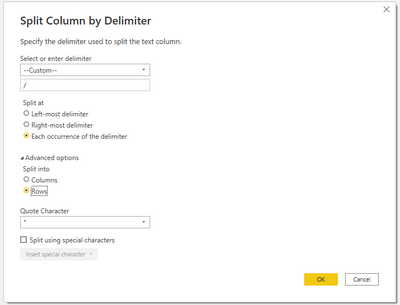
vjingzhang_0-1656907915752.png


I'm not sure if you want to make a category table with distinct values? If so, you can duplicate the query and remove all other columns except the category column. Then use Remove Rows > Remove Duplicates to keep only distinct category values in the query. Apply the queries into Power BI. Then create a relationship between the category table and the Incidents table on category column. If you want to use a pie chart, put category column on Legend. 


Best Regards,
Community Support Team _ Jing
If this post helps, please Accept it as Solution to help other members find it.

View solution in original post

1 REPLY 1
v-jingzhang
Community Support
Community Support

Hi @ld17 


To break up multiple values into individual values, you can use the Split columns by delimiter feature in Power Query Editor. By default, it splits the chosen column into multiple columns. You can expand Advanced options section and select Rows instead. In this way it will expand the rows that have multiple values into multiple rows with all category values in the same column. 

vjingzhang_0-1656907915752.png


I'm not sure if you want to make a category table with distinct values? If so, you can duplicate the query and remove all other columns except the category column. Then use Remove Rows > Remove Duplicates to keep only distinct category values in the query. Apply the queries into Power BI. Then create a relationship between the category table and the Incidents table on category column. If you want to use a pie chart, put category column on Legend. 


Best Regards,
Community Support Team _ Jing
If this post helps, please Accept it as Solution to help other members find it.

Helpful resources

Announcements
Power BI DataViz World Championships

Power BI Dataviz World Championships

The Power BI Data Visualization World Championships is back! Get ahead of the game and start preparing now!

November Power BI Update Carousel

Power BI Monthly Update - November 2025

Check out the November 2025 Power BI update to learn about new features.

FabCon Atlanta 2026 carousel

FabCon Atlanta 2026

Join us at FabCon Atlanta, March 16-20, for the ultimate Fabric, Power BI, AI and SQL community-led event. Save $200 with code FABCOMM.