Get certified for free when you join Fabric Data Days 2026 and dive into Fabric, Power BI, SQL, AI, and other essential data skills.
Join nowData Days is here! Join us now for 60+ days of learning, challenges, and connection. Learn more
Hi there,
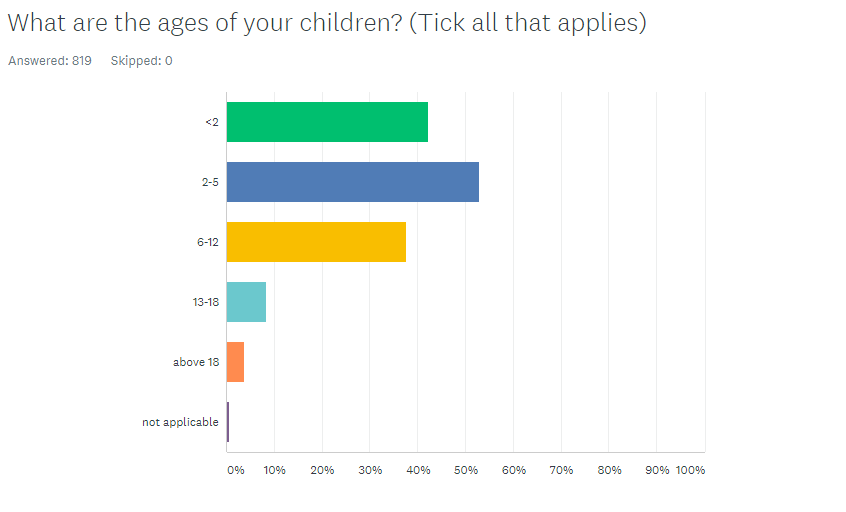
How do I visualize the following multiple choice data:
| Respondent Name | What are the ages of your children? (Tick all that applies) | ||||
| <2 | 2-5 | 6-12 | 13-18 | above 18 | |
| B | 2-5 | ||||
| C | <2 | 2-5 | |||
| D | 13-18 | ||||
| E | 6-12 | ||||
| F | <2 | ||||
| G | 2-5 | 13-18 | |||
| H | <2 | 6-12 | |||
| I | 6-12 | ||||
| J | <2 | 2-5 | 6-12 | ||
| K | <2 | ||||
| L | 6-12 |
Into the following visual (taken from Survey Monkey)
Am quite a basic user when it comes to visualization.
Appreciate your help in advance.
Solved! Go to Solution.
I would suggest that you open the data in Power Query, then select the choices for the question and Unpivot data. I've recently done a webinar on handling survey data. See if it might help you with some best practice tips for yours.
Just click the 'Watch Now!' button under the Survey Says heading: https://www.excelwithallison.com/MCT/news#h.p_NkgcNxVFFYaS
Copying DAX from this post? Click here for a hack to quickly replace it with your own table names
Has this post solved your problem? Please Accept as Solution so that others can find it quickly and to let the community know your problem has been solved.
If you found this post helpful, please give Kudos C
I work as a Microsoft trainer and consultant, specialising in Power BI and Power Query.
www.excelwithallison.com
hI @ngiam
Here's a sample PBIX file containing the following steps and visual.
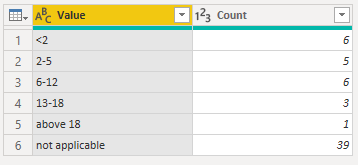
You can unpivot the answer columns in Power Query then do a Group By where those answers are counted. This gives you this table which is based on the sample of data you provided above.
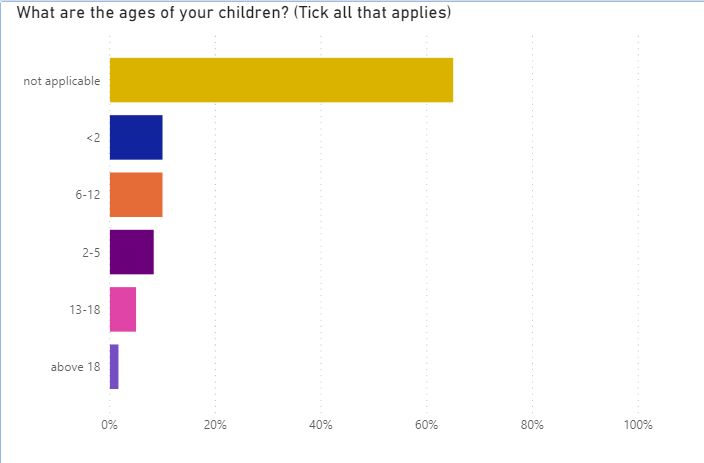
You can use that to produce this visual
Regards
Phil
If I answered your question please mark my post as the solution.
If my answer helped solve your problem, give it a kudos by clicking on the Thumbs Up.
Proud to be a Super User!
50% of respondents in your dataset have children <2
Your visual shows 28,57% because during unpivoting you've got some "extra" respondents
@ngiam , if they separated by space. they use split by a delimiter. https://www.tutorialgateway.org/how-to-split-columns-in-power-bi/
Or Unpivot : https://radacad.com/pivot-and-unpivot-with-power-bi
Transpose : https://yodalearning.com/tutorials/power-query-helps-transposing-data/
I would suggest that you open the data in Power Query, then select the choices for the question and Unpivot data. I've recently done a webinar on handling survey data. See if it might help you with some best practice tips for yours.
Just click the 'Watch Now!' button under the Survey Says heading: https://www.excelwithallison.com/MCT/news#h.p_NkgcNxVFFYaS
Copying DAX from this post? Click here for a hack to quickly replace it with your own table names
Has this post solved your problem? Please Accept as Solution so that others can find it quickly and to let the community know your problem has been solved.
If you found this post helpful, please give Kudos C
I work as a Microsoft trainer and consultant, specialising in Power BI and Power Query.
www.excelwithallison.com
Don't miss out on Data Days, June 15 through August 7. Learn Fabric, Power BI, SQL, AI and more.
Check out the May 2026 Power BI update to learn about new features.
| User | Count |
|---|---|
| 23 | |
| 23 | |
| 21 | |
| 17 | |
| 13 |
| User | Count |
|---|---|
| 58 | |
| 51 | |
| 39 | |
| 29 | |
| 24 |