Join us at FabCon Atlanta from March 16 - 20, 2026, for the ultimate Fabric, Power BI, AI and SQL community-led event. Save $200 with code FABCOMM.
Register now!The Power BI Data Visualization World Championships is back! Get ahead of the game and start preparing now! Learn more
good morning, I am taking a class online, and the teacher's visualization panel looks different than mine, infact, ever youtube video I watch has the "other visualizaiton"
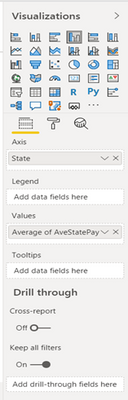
Mine is the one below
How do I get the top visualization, it has different features
Regards
Jill
Solved! Go to Solution.
Hello @bye4now
Both have different versions installed.
The Dark Mode was available on the June 2020 release, released on June 9, 2020.
Hi @bye4now
both pane designs are from different version. The dark pane design was available until June 2019, until than ...
[...] We’ve refreshed much of our interface. We’ve updated all our panes, the footer, and view switcher to be a lighter color, updated spacing, and new icons. Our new look is much more modern and is the first step and refreshing the entire interface.
[...] (https://powerbi.microsoft.com/de-de/blog/power-bi-desktop-june-2019-feature-summary/#panes)
Regards FrankAT
Hello @bye4now
Both have different versions installed.
The Dark Mode was available on the June 2020 release, released on June 9, 2020.
The Power BI Data Visualization World Championships is back! Get ahead of the game and start preparing now!
| User | Count |
|---|---|
| 39 | |
| 37 | |
| 33 | |
| 32 | |
| 29 |
| User | Count |
|---|---|
| 132 | |
| 88 | |
| 82 | |
| 68 | |
| 64 |