
We've captured the moments from FabCon & SQLCon that everyone is talking about, and we are bringing them to the community, live and on-demand. Starts on April 14th. Register now
Hello guys! I have this matrix and i want to put the target of this KPI in a row below the actual value, but in pbi native matrix i can't put the measure in the row. Someone can help me?
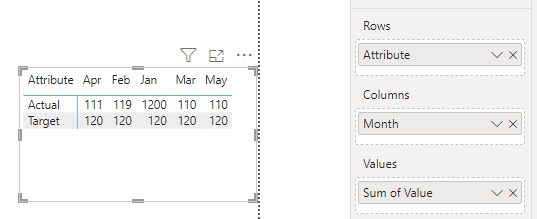
i want it to be like this:
Hi @FelipMark ,
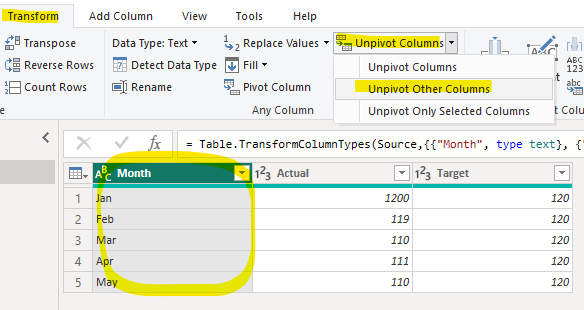
Depending on the information you have provided, you can follow these steps below:
1.Unpivot Columns.
2.Put in Matrix.
How to Get Your Question Answered Quickly - Microsoft Fabric Community
If it does not help, please provide more details with your desired out put and pbix file without privacy information.
Best Regards,
Ada Wang
If this post helps, then please consider Accept it as the solution to help the other members find it more quickly.
In this case, would I have to create an auxiliary table with the desired measurements and concatenate them by period? If so, how do I do this?
I have the target and sales measurements (later I will want to add more to the lines, such as number of customers, sales...).
Do I have to apply them to the columns in the power query?
If you have recently started exploring Fabric, we'd love to hear how it's going. Your feedback can help with product improvements.
A new Power BI DataViz World Championship is coming this June! Don't miss out on submitting your entry.
Share feedback directly with Fabric product managers, participate in targeted research studies and influence the Fabric roadmap.
| User | Count |
|---|---|
| 54 | |
| 39 | |
| 32 | |
| 17 | |
| 15 |
| User | Count |
|---|---|
| 64 | |
| 63 | |
| 37 | |
| 34 | |
| 22 |