cancel
Showing results for 
Search instead for 
Did you mean: 

Learn from the best! Meet the four finalists headed to the FINALS of the Power BI Dataviz World Championships! Register now

Reply
shahar26
New Member

Visualization help

Hello all ,

some questions regarding visualization in powerBI desktop :


1. Can i add a total column to a graph ? for example show sales by region and the another graph for total ?


2.Can i sort a graph showing for example % growth by sales amount without presenting the sales amount?


3.is there option to set colors for specific values in all the report ? for example that Red will always be Western Europe in my report?


Thank you for your help

Shahar

1 ACCEPTED SOLUTION
v-huizhn-msft
Microsoft Employee
Microsoft Employee

Hi @shahar26,

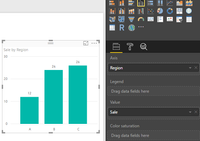
1. If mu understanding is right, you create a bar chart like the following shows. You want to add another bar in the chart to display the total sale, it's impossible to do it, because the y axis value based on the x-axis category(row value in resouce table).

sample tablesample table    bar chartbar chart

You can create another chart only including total sum of sales, please see the screenshot below.

total sum in another charttotal sum in another chart
2. % growth is a column in your resource table? If it is, and the value is unique, you can the x-axis field, click the "Sort by column" under Modeling->  % growth, more details, please review this blog: Sort by column in Power BI Desktop.

3. Please turn on the "Show all" under data colors, you can set different color for specific value on different bars.

4.PNG

Best Regards,
Angelia

View solution in original post

1 REPLY 1
v-huizhn-msft
Microsoft Employee
Microsoft Employee

Hi @shahar26,

1. If mu understanding is right, you create a bar chart like the following shows. You want to add another bar in the chart to display the total sale, it's impossible to do it, because the y axis value based on the x-axis category(row value in resouce table).

sample tablesample table    bar chartbar chart

You can create another chart only including total sum of sales, please see the screenshot below.

total sum in another charttotal sum in another chart
2. % growth is a column in your resource table? If it is, and the value is unique, you can the x-axis field, click the "Sort by column" under Modeling->  % growth, more details, please review this blog: Sort by column in Power BI Desktop.

3. Please turn on the "Show all" under data colors, you can set different color for specific value on different bars.

4.PNG

Best Regards,
Angelia

Helpful resources

Announcements
Power BI DataViz World Championships carousel

Power BI DataViz World Championships - June 2026

A new Power BI DataViz World Championship is coming this June! Don't miss out on submitting your entry.

Join our Fabric User Panel

Join our Fabric User Panel

Share feedback directly with Fabric product managers, participate in targeted research studies and influence the Fabric roadmap.

March Power BI Update Carousel

Power BI Community Update - March 2026

Check out the March 2026 Power BI update to learn about new features.