This is best Fabric, Power BI, SQL and AI community event. How do we know? The last event sold out! Save €200 with code FABCMTY200.
Register nowA new Data Days event is coming soon! This time we’re going bigger than ever. Fabric, Power BI, SQL, AI and more. Don't miss out.
Dear Community,
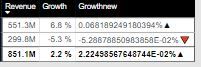
take a look on the below pic.
Growth new measure with unichar code is turning up weird.
Growth new to be showed as same as Growth with green and red indicator.
below are the measures i have used to do that, unfortunately something is not working correctly
Arrows = SWITCH(
TRUE(),
ISBLANK([Growth])
|| ISBLANK([Growth]),BLANK(),
[Growth] = 0, "No Data",
[Growth] >= 0,UNICHAR(9650),
[Growth] <= 0,UNICHAR(128315),
BLANK()
)
Growth =
VAR __BASELINE_VALUE = SUM('Inbound'[TER_PFYTD_Constant])
VAR __VALUE_TO_COMPARE = SUM('Inbound'[TER_FYTD_Constant])
RETURN
IF(
NOT ISBLANK(__VALUE_TO_COMPARE),
DIVIDE(__VALUE_TO_COMPARE - __BASELINE_VALUE, __BASELINE_VALUE)
)
Growthnew = CONCATENATE(CONCATENATE([Growth],"%"),Inbound[Arrows])
Solved! Go to Solution.
I think i figured it out, my measure should look like below
Growthnew =
CONCATENATE ( FORMAT ( [Growth], "0.0%" ), Inbound[Arrows] )
Hi @vjnvinod
You may try below measure:
Growthnew = CONCATENATE ( FORMAT ( [Growth], "percent" ), Inbound[Arrows] )
Regards,
Cherie
This is helpful, but i see the decimal point is coming as 2, as a result of the measure you have shared.
6.82% etc
any how to round this to 1 decimal point? thanks for your help.
I think i figured it out, my measure should look like below
Growthnew =
CONCATENATE ( FORMAT ( [Growth], "0.0%" ), Inbound[Arrows] )
You need to FORMAT the GROWTH measure when you concatenate it to your symbol. It's nothing to do with UNICHAR, it's just showing as the exact decimal result of your divide calculation
I don't think it's anything to do with the UNICHAR, it's just that the result of the GROWTH calculation is showing as an unformatted decimal number with your character tagged on the end. You need to give it a format .
Check out the May 2026 Power BI update to learn about new features.
Sign up to receive a private message when registration opens and key events begin.
If you have recently started exploring Fabric, we'd love to hear how it's going. Your feedback can help with product improvements.
| User | Count |
|---|---|
| 31 | |
| 26 | |
| 23 | |
| 22 | |
| 15 |
| User | Count |
|---|---|
| 62 | |
| 47 | |
| 28 | |
| 24 | |
| 21 |