Share feedback directly with Fabric product managers, participate in targeted research studies and influence the Fabric roadmap.
Sign up nowGet Fabric certified for FREE! Don't miss your chance! Learn more
Hello All,
Can i change the color of my visualization based on their result. Example if my Data for December is 1.91% and my Expected Target is 0.50% and Minimum Target is 2.00% the result for December must be color yellow and if it's below .50% it will be color red. Is it possible in Power BI?
Solved! Go to Solution.
Hi @aicirtap027
You can use Conditional formating.
1. In data colors section click on three dots
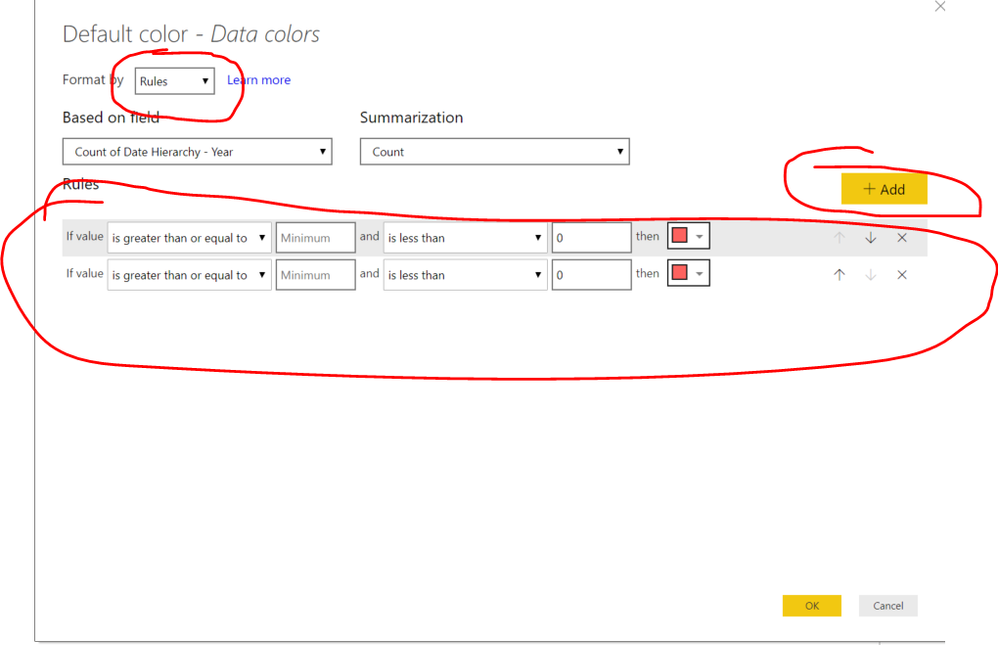
2. Change Format by to by Rules and set your rules
Hi @aicirtap027
You can use Conditional formating.
1. In data colors section click on three dots
2. Change Format by to by Rules and set your rules
Share feedback directly with Fabric product managers, participate in targeted research studies and influence the Fabric roadmap.
| User | Count |
|---|---|
| 62 | |
| 62 | |
| 42 | |
| 21 | |
| 18 |
| User | Count |
|---|---|
| 120 | |
| 105 | |
| 38 | |
| 29 | |
| 28 |