cancel
Showing results for 
Search instead for 
Did you mean: 

We've captured the moments from FabCon & SQLCon that everyone is talking about, and we are bringing them to the community, live and on-demand. Starts on April 14th. Register now

Reply
Southernhammer
New Member

Visualization Measure Formula

Hi,


I'm very new to Power BI but have recently taken over from someone a lot more experienced so I'm struggling to understand exactly what they have done and how to modify it.


The report I am struggling with contain two date slicer boxes where the user can select the start and end date of a search with a 'card' visualizer set up to display how many results are found. This looks at a date column from a previously created query table. I now need to change which column this card visualizer is looking at as there are multiple date columns. My research suggests this is done through a measure but I cannot confirm that and cannot find any way to view any active measures. If I could look at the formula, I could easily update it to the new column but I just cannot find any way to view what is currently being run. Unfortunately my experience just isn't good enough to even be able to express what I'm looking for in a search so I'm completely stuck.


Any possible help or ideas would be hugely appreciated!


Thanks

1 ACCEPTED SOLUTION
Idrissshatila
Super User
Super User

Hello,


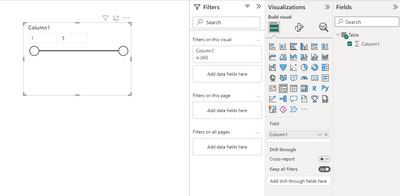
You can click on the visual and then look at the field pane at the right you can see the tables and the fields there as well as the measure, and you will see the used field with a correct sign on itlike the following screenshot

Idrissshatila_0-1671459823432.png

If I answered your question, please mark my post as solution, Appreciate your Kudos!


Did I answer your question? Mark my post as a solution! Appreciate your Kudos
Follow me on LinkedIn linkedIn
Vote for my Community Mobile App Idea

Proud to be a Super User!


View solution in original post

2 REPLIES 2
Idrissshatila
Super User
Super User

Hello,


You can click on the visual and then look at the field pane at the right you can see the tables and the fields there as well as the measure, and you will see the used field with a correct sign on itlike the following screenshot

Idrissshatila_0-1671459823432.png

If I answered your question, please mark my post as solution, Appreciate your Kudos!


Did I answer your question? Mark my post as a solution! Appreciate your Kudos
Follow me on LinkedIn linkedIn
Vote for my Community Mobile App Idea

Proud to be a Super User!


Thanks! It was so obvious this whole time 😅 

Helpful resources

Announcements
New to Fabric survey Carousel

New to Fabric Survey

If you have recently started exploring Fabric, we'd love to hear how it's going. Your feedback can help with product improvements.

Power BI DataViz World Championships carousel

Power BI DataViz World Championships - June 2026

A new Power BI DataViz World Championship is coming this June! Don't miss out on submitting your entry.

Join our Fabric User Panel

Join our Fabric User Panel

Share feedback directly with Fabric product managers, participate in targeted research studies and influence the Fabric roadmap.

March Power BI Update Carousel

Power BI Community Update - March 2026

Check out the March 2026 Power BI update to learn about new features.