My question (also posted inside the pbix file):
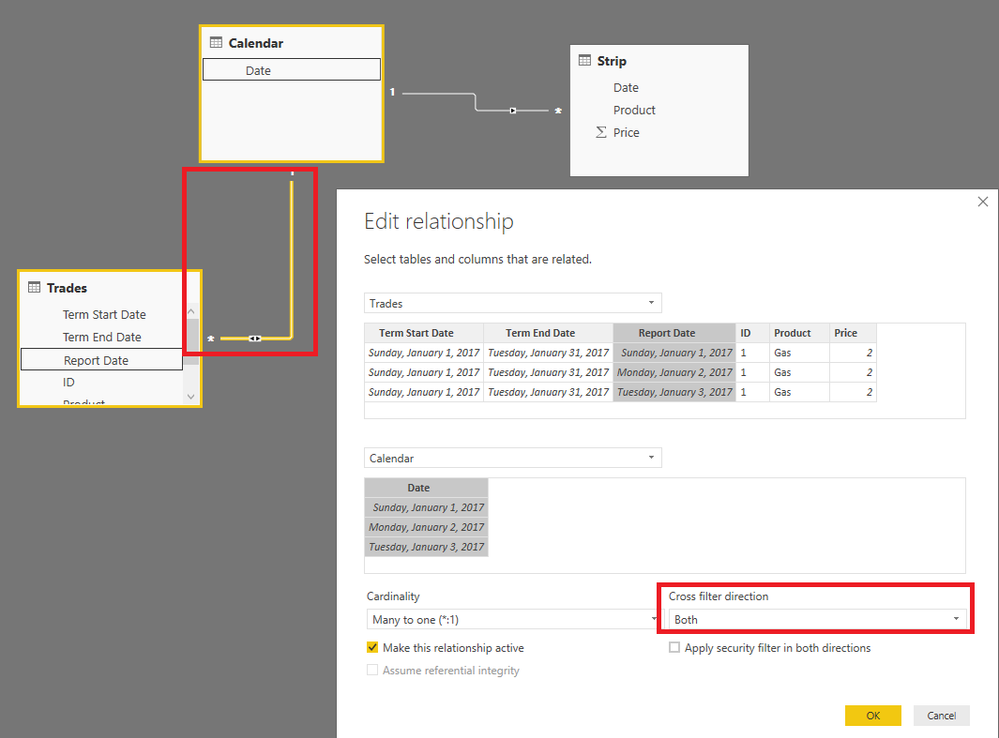
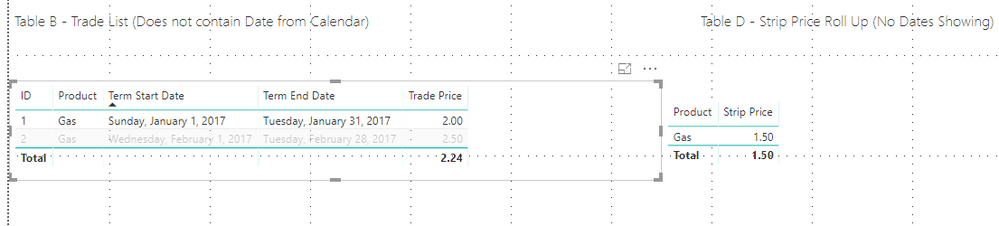
Here is my issue - I have related two tables (Strip and Trades) via Calendar (Trades: Report Date, Strip: Date). I would like my visualization to look like Table B (see image or model).
Report Date field- this is essentially all of the dates, blown out, for a each Trade ID between and including the Term Start Date and Term End Date.
I want to be able to click on a line item for a Trade ID in Table B and have Table C and Table D reflect the "Report Dates" associated to the trade. However, because Report Date does not exist in Table B, Tables C and D do not change, as a result, they reflect all dates.
The only work around I have found is to put Report Dates into the table - as seen in Table A. I can hold CTRL and select each associated line item to a specific Trade ID. This filters the Tables C and D accordingly.
I do not want to use a slicer that utilizes Calendar - Date, because it doesn't provide the flexibility that I am looking for.
Is it possible to achieve what I want using Table B?
Exmaple of the result I am looking for: Select ID 1 in Table B, Table D = 1.50
Image Link
Model Link