Join us at FabCon Atlanta from March 16 - 20, 2026, for the ultimate Fabric, Power BI, AI and SQL community-led event. Save $200 with code FABCOMM.
Register now!The Power BI Data Visualization World Championships is back! Get ahead of the game and start preparing now! Learn more
I'm new to Power BI and I try to follow the exercise provided by Microsoft. Below is the exercise link that provided by Microsoft:
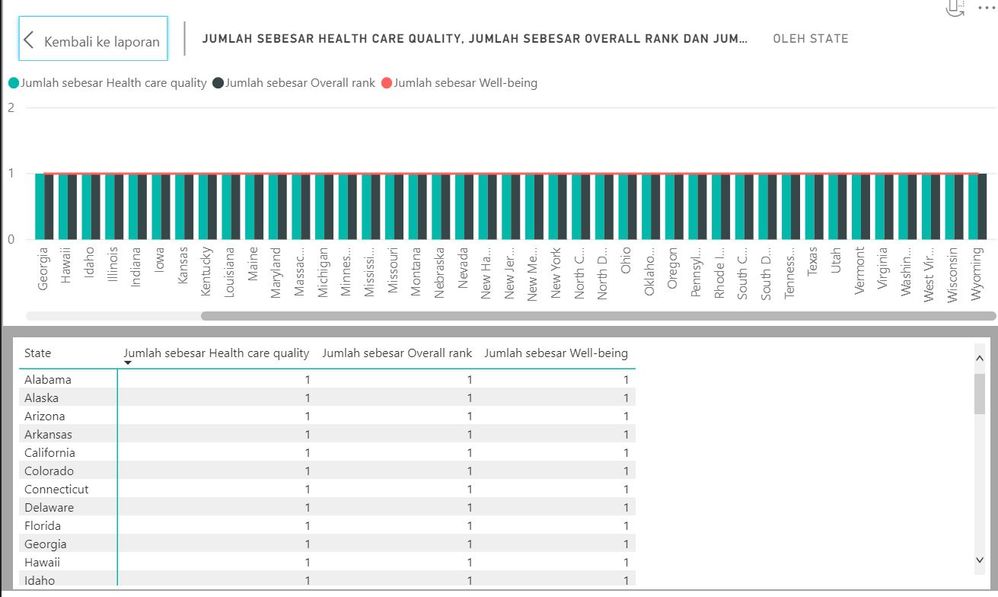
I follow the instruction smoothly until it comes Second visual part. I already drag the State, Overall Rank, Healthcare quality, and Well-being field onto the visual. Then I click the Line and clustered column chart visual. The problem is all my data values become 1.
This is when I visualized it
This is the data provided by the web
Idk where is my problem is, i follow the instruction thoroughly.
Solved! Go to Solution.
Change the data type and take a look at Change how a numeric field is aggregated.
The Power BI Data Visualization World Championships is back! Get ahead of the game and start preparing now!
| User | Count |
|---|---|
| 39 | |
| 38 | |
| 38 | |
| 28 | |
| 27 |
| User | Count |
|---|---|
| 124 | |
| 88 | |
| 73 | |
| 66 | |
| 65 |