Join us at FabCon Atlanta from March 16 - 20, 2026, for the ultimate Fabric, Power BI, AI and SQL community-led event. Save $200 with code FABCOMM.
Register now!Vote for your favorite vizzies from the Power BI Dataviz World Championship submissions. Vote now!
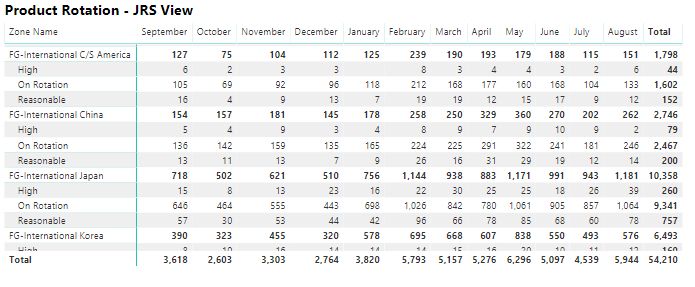
I have this matrix that I think could be more useful to users if it were displayed as a graphical visualization rather than just a bunch of numbers. Any suggestions on a good visualization to display this instead of the matrix? As you can see, it is time based (Year then Month) and uses two dimensions (Zone Name and Order Lag) to break down the values (Count of Sales Order Number).
Solved! Go to Solution.
Hi @bgarland,
You can use the waterfall chart to have a try.
Regards,
Frank
Hi @bgarland,
Does that make sense? If so, kindly mark my answer as a solution to close the case.
Regards,
Frank
Actually, I went with a clustered column.
How about clustered column chart?
Thanks
Raj
Vote for your favorite vizzies from the Power BI World Championship submissions!
If you love stickers, then you will definitely want to check out our Community Sticker Challenge!
Check out the January 2026 Power BI update to learn about new features.
| User | Count |
|---|---|
| 64 | |
| 56 | |
| 43 | |
| 20 | |
| 17 |
| User | Count |
|---|---|
| 123 | |
| 108 | |
| 44 | |
| 32 | |
| 26 |