cancel
Showing results for 
Search instead for 
Did you mean: 

Learn from the best! Meet the four finalists headed to the FINALS of the Power BI Dataviz World Championships! Register now

Reply
Anonymous
Not applicable

Visualisation help

Hello,


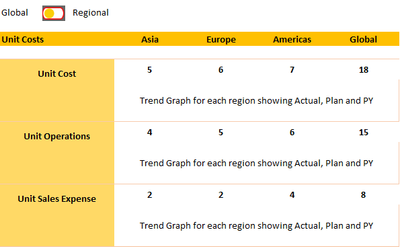
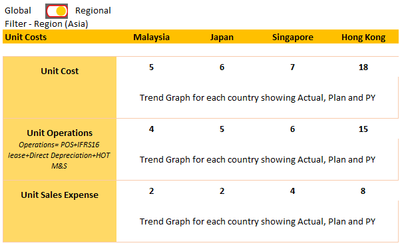
I am trying to create the following Visualisation in Power Bi and I am at a loss on how to even desgin it. I would greatly appreciate if anyone could give me an initial idea/start so that i can build upon that!


Thank you!


Undercover95_0-1598872881979.png


Undercover95_1-1598872901518.png


1 ACCEPTED SOLUTION
v-xuding-msft
Community Support
Community Support

Hi @Anonymous ,


It can be implemented to use bookmarks. You could reference the blogs and video to create a toggle to switch visuals in one page. 


https://radacad.com/bookmarks-and-buttons-making-power-bi-charts-even-more-interactive

https://www.blue-granite.com/blog/using-data-driven-images-for-navigating-power-bi-bookmarks

https://www.youtube.com/watch?v=_Afcj8mT5_Q


Best Regards,
Xue Ding
If this post helps, then please consider Accept it as the solution to help the other members find it more quickly.

View solution in original post

3 REPLIES 3
Greg_Deckler
Community Champion
Community Champion

@Anonymous - Just following up on this, @v-xuding-msft has the generally accepted answer to this with using bookmarks. There are other ways however, like this:

https://community.powerbi.com/t5/Quick-Measures-Gallery/Dynamic-EVERYTHING-measures-axis-legend-titles-chart-types/m-p/1027881#M444


Follow on LinkedIn
@ me in replies or I'll lose your thread!!!
Instead of a Kudo, please vote for this idea
Become an expert!: Enterprise DNA
External Tools: MSHGQM
YouTube Channel!: Microsoft Hates Greg
Latest book!:
DAX For Humans

DAX is easy, CALCULATE makes DAX hard...
v-xuding-msft
Community Support
Community Support

Hi @Anonymous ,


It can be implemented to use bookmarks. You could reference the blogs and video to create a toggle to switch visuals in one page. 


https://radacad.com/bookmarks-and-buttons-making-power-bi-charts-even-more-interactive

https://www.blue-granite.com/blog/using-data-driven-images-for-navigating-power-bi-bookmarks

https://www.youtube.com/watch?v=_Afcj8mT5_Q


Best Regards,
Xue Ding
If this post helps, then please consider Accept it as the solution to help the other members find it more quickly.
amitchandak
Super User
Super User

@Anonymous , IN matrix show on the row with sparkline


https://www.youtube.com/watch?v=xLD8HKwPWHE


https://www.burningsuit.co.uk/blog/2019/04/7-secrets-of-the-matrix-visual/

Share with Power BI Enthusiasts: Full Power BI Video (20 Hours) YouTube
Microsoft Fabric Series 60+ Videos YouTube
Microsoft Fabric Hindi End to End YouTube

Helpful resources

Announcements
Power BI DataViz World Championships carousel

Power BI DataViz World Championships - June 2026

A new Power BI DataViz World Championship is coming this June! Don't miss out on submitting your entry.

Join our Fabric User Panel

Join our Fabric User Panel

Share feedback directly with Fabric product managers, participate in targeted research studies and influence the Fabric roadmap.

March Power BI Update Carousel

Power BI Community Update - March 2026

Check out the March 2026 Power BI update to learn about new features.