cancel
Showing results for 
Search instead for 
Did you mean: 

Vote for your favorite vizzies from the Power BI Dataviz World Championship submissions. Vote now!

Reply
paulineCom
Helper I
Helper I

Visualisation filter issue

Hello,


Any visualisation is loaded when we arrive on a dashboard page. Is there a way to make them load only if there is a filter activated ?


(i would like to have some visualisation when my dashboard is loading but one empty, and waiting for the customer to apply one peculiar type of filter before it's shwoing data.)


Is there a way to do it ?  I've searched in a lot of documentation, for exemple this video https://www.youtube.com/watch?list=PL1N57mwBHtN0JFoKSR0n-tBkUJHeMP2cP&v=UOKbxTXZrWw&feature=emb_logo

But those functionality aren't responding to my problem. 


Thank you for helping me,

Regards, 

Pauline ATTAL

3 REPLIES 3
Syndicate_Admin
Administrator
Administrator

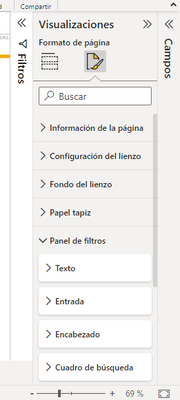
The same thing happened to me and I did the following:

Select filter panel--> text--> black color

HVENEGAS_0-1657219166372.png

parry2k
Super User
Super User

@paulineCom why not create a page with filters you want to start with and also add a button, on click of the button after filter selection is done, go to the respective page, read more here buttons and page navigation.


I would  Kudos if my solution helped. 👉 If you can spend time posting the question, you can also make efforts to give Kudos whoever helped to solve your problem. It is a token of appreciation!

Visit us at https://perytus.com, your one-stop shop for Power BI related projects/training/consultancy.


Subscribe to the @PowerBIHowTo YT channel for an upcoming video on List and Record functions in Power Query!!

Learn Power BI and Fabric - subscribe to our YT channel - Click here: @PowerBIHowTo

If my solution proved useful, I'd be delighted to receive Kudos. When you put effort into asking a question, it's equally thoughtful to acknowledge and give Kudos to the individual who helped you solve the problem. It's a small gesture that shows appreciation and encouragement! ❤


Did I answer your question? Mark my post as a solution. Proud to be a Super User! Appreciate your Kudos 🙂
Feel free to email me with any of your BI needs.

Yes this is a great solution to dodge the problem, i thought about that, but it's not as ergonomic as i hoped.


Is there a plugin, or maybee we have to create our own visualization ? But I don't even know if it's possible to create this kinf of visulazation.


Maybe you know a visualization that works similarly ?


Regards.


Helpful resources

Announcements
Power BI DataViz World Championships

Power BI Dataviz World Championships

Vote for your favorite vizzies from the Power BI World Championship submissions!

Sticker Challenge 2026 Carousel

Join our Community Sticker Challenge 2026

If you love stickers, then you will definitely want to check out our Community Sticker Challenge!

January Power BI Update Carousel

Power BI Monthly Update - January 2026

Check out the January 2026 Power BI update to learn about new features.

FabCon Atlanta 2026 carousel

FabCon Atlanta 2026

Join us at FabCon Atlanta, March 16-20, for the ultimate Fabric, Power BI, AI and SQL community-led event. Save $200 with code FABCOMM.