cancel
Showing results for 
Search instead for 
Did you mean: 

Learn from the best! Meet the four finalists headed to the FINALS of the Power BI Dataviz World Championships! Register now

Reply
tdmkps
Frequent Visitor

Visualisation cannot show Text column without Aggregate

Hi guys,


I've been playing around with PowerBI for a month or so and have a hit a real brickwall with connecting to our on-Premise Dynamics CRM.


I have 3 tables Opportunity, Contact and Biography ( a custom entity for storing different text notes).
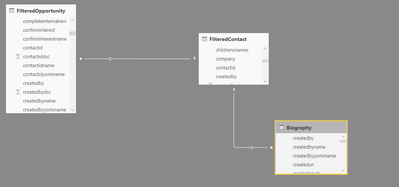
image.png

All three tables are connecting by the CRM standard ContactID field. On my visualisations I am trying to pull information about the opportunity (Estimated Value, status), the contact (net worth) and the related Biography notes. It works absolutely fine between contact and opportunity but the moment I add the Notes field from Biography it errors
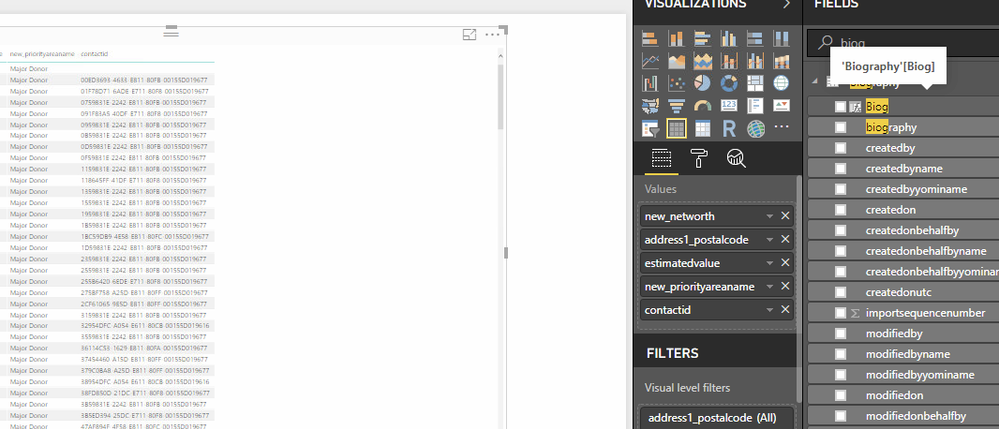
image.pngimage.png


Interestingly, if I set the textfield (Biog) to first/last aggregation it sort of works in that the table comes back but it's all the same note.


I have been able to accomplish this in SSRS without issue by using =lookup(fields!contactid.Value,fields!new_contact.Value, fields!new_notes.Value, "biography") so I tried  LOOKUPVALUES expression in DAX but that errors out saying a single table of values was expected but multiple supplied. I've tried changing the cross filtering and whether it is 1:n, N:1 or 1:1 and nothing seems to work. 


It is fair to note that there will be duplicates of the contactID in the Biography table because there are multiple notes that can be applied to a single contact or account. If you need anything more please feel free to ask as I'm tearing my hair out!

1 REPLY 1
v-juanli-msft
Community Support
Community Support

Hi @tdmkps

In this scenario, the filter context will then be lost when going from opportunity to Biography for there are many duplicates values for the main key columns.

If you want to use columns from Biography with columns in opportunity, you need to use these columns within some functions, like sum, max, ect.

If you only want to display all values from the related table, you need determine how the duplicates values in that columns should be related, then use the function, like crossjoin, union, to join the two tables together.

This article discuss about many to many relationship using dax, also this thread share some ideas of handling many to many relationship in powre bi.


Best Regards

Maggie

Helpful resources

Announcements
Join our Fabric User Panel

Join our Fabric User Panel

Share feedback directly with Fabric product managers, participate in targeted research studies and influence the Fabric roadmap.

February Power BI Update Carousel

Power BI Monthly Update - February 2026

Check out the February 2026 Power BI update to learn about new features.

FabCon Atlanta 2026 carousel

FabCon Atlanta 2026

Join us at FabCon Atlanta, March 16-20, for the ultimate Fabric, Power BI, AI and SQL community-led event. Save $200 with code FABCOMM.

Top Kudoed Authors