A new Data Days event is coming soon!
This time we’re going bigger than ever. Fabric, Power BI, SQL, AI and more. We're covering it all. You won't want to miss it.
Learn more- Power BI forums
- Get Help with Power BI
- Desktop
- Service
- Report Server
- Power Query
- Mobile Apps
- Developer
- DAX Commands and Tips
- Custom Visuals Development Discussion
- Health and Life Sciences
- Power BI Spanish forums
- Translated Spanish Desktop
- Training and Consulting
- Instructor Led Training
- Dashboard in a Day for Women, by Women
- Galleries
- Data Stories Gallery
- Themes Gallery
- Contests Gallery
- QuickViz Gallery
- Quick Measures Gallery
- Visual Calculations Gallery
- Notebook Gallery
- Translytical Task Flow Gallery
- TMDL Gallery
- R Script Showcase
- Webinars and Video Gallery
- Ideas
- Custom Visuals Ideas (read-only)
- Issues
- Issues
- Events
- Upcoming Events
Level up your Power BI skills this month - build one visual each week and tell better stories with data! Get started
- Power BI forums
- Forums
- Get Help with Power BI
- Desktop
- Re: Visual problem by showing total
- Subscribe to RSS Feed
- Mark Topic as New
- Mark Topic as Read
- Float this Topic for Current User
- Bookmark
- Subscribe
- Printer Friendly Page

- Mark as New
- Bookmark
- Subscribe
- Mute
- Subscribe to RSS Feed
- Permalink
- Report Inappropriate Content
Visual problem by showing total
I have a problem.
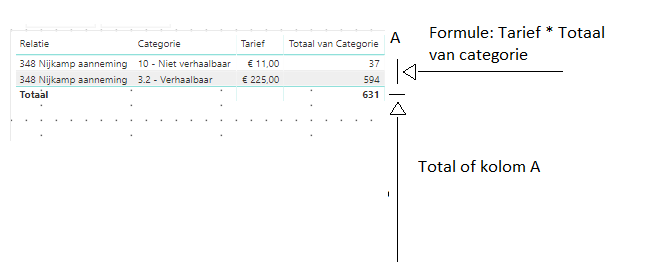
I made a visual in that visual are 2 colomns named Tarief and Totaal van Categerie.
No is my problem that i want to show the totals of those two after they multiplied with formule:
Tarief * Totaal van Categorie. How can i do this.
Solved! Go to Solution.


- Mark as New
- Bookmark
- Subscribe
- Mute
- Subscribe to RSS Feed
- Permalink
- Report Inappropriate Content
hi, @NvdVeerdonk
For your case, try this formula
Measure = CALCULATE(SUMX('Tarieven 02','Tarieven 02'[Tarief]*CALCULATE(COUNTA('20190508 0916 export'[Categorie]))))
Result:

Best Regards,
Lin
If this post helps, then please consider Accept it as the solution to help the other members find it more quickly.
- Mark as New
- Bookmark
- Subscribe
- Mute
- Subscribe to RSS Feed
- Permalink
- Report Inappropriate Content
hi, @NvdVeerdonk
For your case, just create a calculate measure by this formula:
Measure = CALCULATE(SUM('Table'[Tarief]))*CALCULATE(SUM('Table'[Totaal van Categerie]))
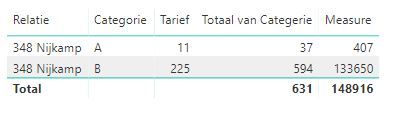
https://docs.microsoft.com/en-us/power-bi/desktop-tutorial-create-measures
https://docs.microsoft.com/en-us/power-bi/desktop-measures
By the way: If you want the total of the measure is 407+133650= 134057 not 148916
You could see this post about it here: https://community.powerbi.com/t5/DAX-Commands-and-Tips/Dealing-with-Measure-Totals/td-p/63376
Also, this Quick Measure, Measure Totals:
https://community.powerbi.com/t5/Quick-Measures-Gallery/Measure-Totals-The-Final-Word/m-p/547907
Then for your case, use this measure formula:
Measure 2 =
VAR _table =
    SUMMARIZE (
        'Table',
        'Table'[Relatie],
        'Table'[Categorie],
        "_total", CALCULATE ( SUM ( 'Table'[Tarief] ) )
            * CALCULATE ( SUM ( 'Table'[Totaal van Categerie] ) )
    )
RETURN
    SUMX ( _table, [_total] )
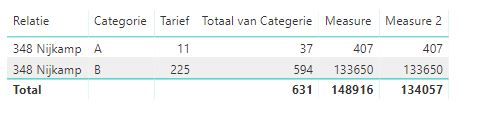
here is pbix file, please try it.
Best Regards,
Lin
If this post helps, then please consider Accept it as the solution to help the other members find it more quickly.
- Mark as New
- Bookmark
- Subscribe
- Mute
- Subscribe to RSS Feed
- Permalink
- Report Inappropriate Content
Dear Lin,
Thank you for the answer. I understand the measure only it gifs an error because "Totaal van Categorie" isn't a kolom in a table. This the valuwe Categorie. so i can't find Totaal van categorie and when i use Categorie i can't use the measure anywere.
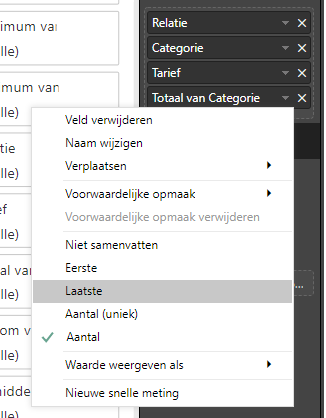
Best Regards,
Nicole
- Mark as New
- Bookmark
- Subscribe
- Mute
- Subscribe to RSS Feed
- Permalink
- Report Inappropriate Content
hi, @NvdVeerdonk
Which column are not numeric type?
Could you share your simple sample pbix file for us?
Best Regards,
Lin
If this post helps, then please consider Accept it as the solution to help the other members find it more quickly.
- Mark as New
- Bookmark
- Subscribe
- Mute
- Subscribe to RSS Feed
- Permalink
- Report Inappropriate Content
Hi @v-lili6-msft,
I'm just learning Power BI.
How can i send you the sample?
i can share the data whit you but i need your E-mail ore you can requested an acces to the data:
Let me know what i have to do.
Best Regards,
Van de Veerdonk
- Mark as New
- Bookmark
- Subscribe
- Mute
- Subscribe to RSS Feed
- Permalink
- Report Inappropriate Content
hi, @NvdVeerdonk
You can upload it to OneDrive and post the link here.
or send link just by private letter.
Do mask sensitive data before uploading.
Best Regards,
Lin
If this post helps, then please consider Accept it as the solution to help the other members find it more quickly.
- Mark as New
- Bookmark
- Subscribe
- Mute
- Subscribe to RSS Feed
- Permalink
- Report Inappropriate Content
- Mark as New
- Bookmark
- Subscribe
- Mute
- Subscribe to RSS Feed
- Permalink
- Report Inappropriate Content
hi, @NvdVeerdonk
For your case, try this formula
Measure = CALCULATE(SUMX('Tarieven 02','Tarieven 02'[Tarief]*CALCULATE(COUNTA('20190508 0916 export'[Categorie]))))
Result:
Best Regards,
Lin
If this post helps, then please consider Accept it as the solution to help the other members find it more quickly.

Helpful resources

Power BI Monthly Update - April 2026
Check out the April 2026 Power BI update to learn about new features.

Data Days 2026 coming soon!
Sign up to receive a private message when registration opens and key events begin.

New to Fabric Survey
If you have recently started exploring Fabric, we'd love to hear how it's going. Your feedback can help with product improvements.

Power BI DataViz World Championships - June 2026
A new Power BI DataViz World Championship is coming this June! Don't miss out on submitting your entry.

| User | Count |
|---|---|
| 31 | |
| 25 | |
| 21 | |
| 18 | |
| 17 |


| User | Count |
|---|---|
| 62 | |
| 35 | |
| 34 | |
| 24 | |
| 24 |


