cancel
Showing results for 
Search instead for 
Did you mean: 

Learn from the best! Meet the four finalists headed to the FINALS of the Power BI Dataviz World Championships! Register now

Reply
Anonymous
Not applicable

Visual help

Hi All,

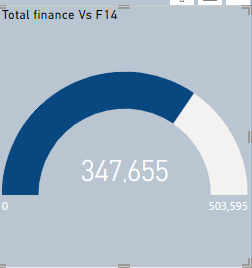
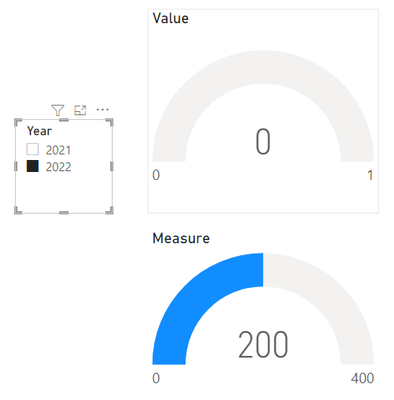
I have a visual which has a filter on it so that it only shows the current year data.
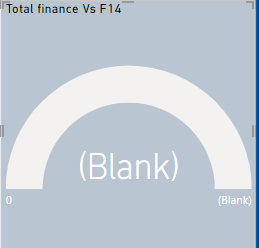
However, when a slicer is used to select a different year it over rules the filter on the visual. 

Is there a way to stop the filter on the visual from being overruled?

Maleehah_0-1652258473641.png

when slicer date is changed visual turns to 

Maleehah_1-1652259088282.png


1 ACCEPTED SOLUTION
Deermeat
Resolver I
Resolver I

@Anonymous 


Have you tried editing the interaction of the slicer to not effect that visual? 

https://docs.microsoft.com/en-us/power-bi/create-reports/service-reports-visual-interactions?tabs=powerbi-desktop


View solution in original post

2 REPLIES 2
v-zhangti
Community Support
Community Support

Hi, @Anonymous 


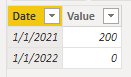
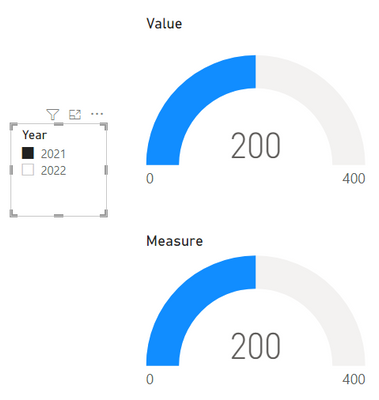
You can try to use Measure and use the ALLEXCEPT function. You can refer to the following example.

vzhangti_0-1652692520262.png

Measure:

Measure =
CALCULATE ( SUM ( 'Table'[Value] ), ALLEXCEPT ( 'Table', 'Table'[Date] ) )

vzhangti_1-1652692601111.pngvzhangti_2-1652692615250.png

ALLEXCEPT:

Removes all context filters in the table except filters that have been applied to the specified columns.

https://docs.microsoft.com/dax/allexcept-function-dax 


Best Regards,

Community Support Team _Charlotte

If this post helps, then please consider Accept it as the solution to help the other members find it more quickly.

Deermeat
Resolver I
Resolver I

@Anonymous 


Have you tried editing the interaction of the slicer to not effect that visual? 

https://docs.microsoft.com/en-us/power-bi/create-reports/service-reports-visual-interactions?tabs=powerbi-desktop


Helpful resources

Announcements
Join our Fabric User Panel

Join our Fabric User Panel

Share feedback directly with Fabric product managers, participate in targeted research studies and influence the Fabric roadmap.

February Power BI Update Carousel

Power BI Monthly Update - February 2026

Check out the February 2026 Power BI update to learn about new features.

FabCon Atlanta 2026 carousel

FabCon Atlanta 2026

Join us at FabCon Atlanta, March 16-20, for the ultimate Fabric, Power BI, AI and SQL community-led event. Save $200 with code FABCOMM.