
cancel
Showing results for 
Search instead for 
Did you mean: 

Get Fabric Certified for FREE during Fabric Data Days. Don't miss your chance! Request now

Reply
Anonymous
Not applicable

Visual Recommendation

I am currenty using slicers on the left-rail of my Power BI experience to allow people to "filter" to the information they need.  


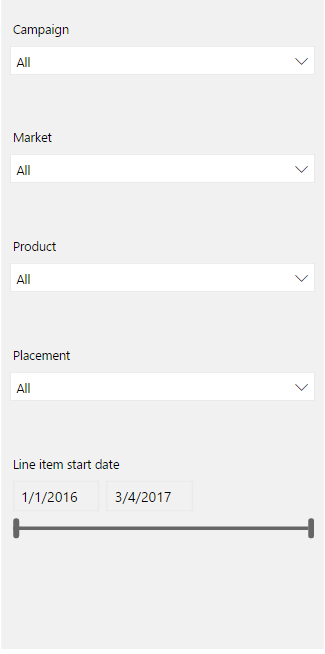
For visual purposes, I have a gray shape (rectangle) that I inserted to work like a background as a visual indicator for the user that this where they interact with the data (Fig A).  The problem is that the inserted shape is clickable, and as people may accidentally select it, bringing it forward which is annoying to the user and interrupts their experience.  (Fig B)


Is there a way to add make this shape static and unclickable?  I do not think a watermark solution would work.


Thanks


Fig A


Nav Bar.PNG


Fig B (When accidentally Clicked)


nav cl.PNG


4 REPLIES 4
Seth_C_Bauer
Community Champion
Community Champion

@Anonymous @Greg_Deckler I could have sworn that the pictures or background shapes didn't come forward for end users... But that certainly isn't the case right now...


Looking for more Power BI tips, tricks & tools? Check out PowerBI.tips the site I co-own with Mike Carlo. Also, if you are near SE WI? Join our PUG Milwaukee Brew City PUG
Anonymous
Not applicable

Thanks @Seth_C_Bauer @Greg_Deckler


To be clear it is not a "background" (as in watermark) image, it is simply a shape that has been "sent to back".  Not sure if this helps lead to a more viable solution.


I find PowerBI to be a great tool, but a little short on some of the nuanced UX aspects (like this).  Another is "forcing" a preferred sort order in slicers.


Please let me know if you have any additional feedback.  Thanks.

@Anonymous Yeah, shouldn't matter if it is a shape or an image. It shouldn't come forward for the end user, and I'm fairly certain that it wasn't.. I'll dig around.


Looking for more Power BI tips, tricks & tools? Check out PowerBI.tips the site I co-own with Mike Carlo. Also, if you are near SE WI? Join our PUG Milwaukee Brew City PUG
Greg_Deckler
Community Champion
Community Champion

No way that I know of but would make a good Idea. Perhaps you could create a graphic with the gray box and a bunch of white on the right of it and set it as the background of the page?


Follow on LinkedIn
@ me in replies or I'll lose your thread!!!
Instead of a Kudo, please vote for this idea
Become an expert!: Enterprise DNA
External Tools: MSHGQM
YouTube Channel!: Microsoft Hates Greg
Latest book!:
DAX For Humans

DAX is easy, CALCULATE makes DAX hard...

Helpful resources

Announcements
November Power BI Update Carousel

Power BI Monthly Update - November 2025

Check out the November 2025 Power BI update to learn about new features.

Fabric Data Days Carousel

Fabric Data Days

Advance your Data & AI career with 50 days of live learning, contests, hands-on challenges, study groups & certifications and more!

FabCon Atlanta 2026 carousel

FabCon Atlanta 2026

Join us at FabCon Atlanta, March 16-20, for the ultimate Fabric, Power BI, AI and SQL community-led event. Save $200 with code FABCOMM.

Top Solution Authors
Top Kudoed Authors