cancel
Showing results for 
Search instead for 
Did you mean: 

The Power BI Data Visualization World Championships is back! It's time to submit your entry. Live now!

Reply
LYeo87
Helper II
Helper II

Visual Help

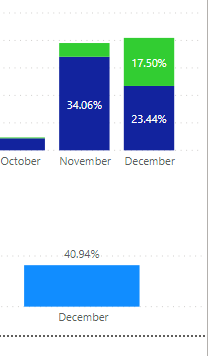
Hi Have 2 graphs - the 1st is showing me the percentage of jobs over the year - so for example Dec equals 40.94%.


I then have a second graph that shows me these jobs broken down into 2 x categories - YES/NO.


In dec - these are showing as 33.13% and 7.81% - how can i change this so they are not the % of year, but for Dec so that they equal 100%?

4 REPLIES 4
amitchandak
Super User
Super User

@LYeo87 , You have try measures like


divide(sum(Table[total]),calculate(sum(Table[total]) , allexcept(Table, Table[month Year])))

divide(sum(Table[total]),calculate(sum(Table[total]) , filter(allselected(Table), Table[key#] =max(Table[month Year]))))


also refer

https://community.powerbi.com/t5/Desktop/Percentage-of-subtotal/td-p/95390

Share with Power BI Enthusiasts: Full Power BI Video (20 Hours) YouTube
Microsoft Fabric Series 60+ Videos YouTube
Microsoft Fabric Hindi End to End YouTube
Anand24
Super User
Super User

Hi @LYeo87 ,


Can you please provide sample data and expected output?

You will need to use either of ALL, ALLSELECTED or ALLEXCEPT in your DAX but which one to use will be based on your data.


Give a thumbs up if this post helped you in any way and mark this post as solution if it solved your query !!!

LYeo87_0-1609254457412.png

Top graph is used with a new column - IF statement. Buttom is purely totals 


Anonymous
Not applicable

Hi @LYeo87 ,

Could you please share some sample data and applied fields/measures on your two graph in order to provide you a suitable solution? If there is any measure applied on the graph, please also provide the related formula. Thank you.

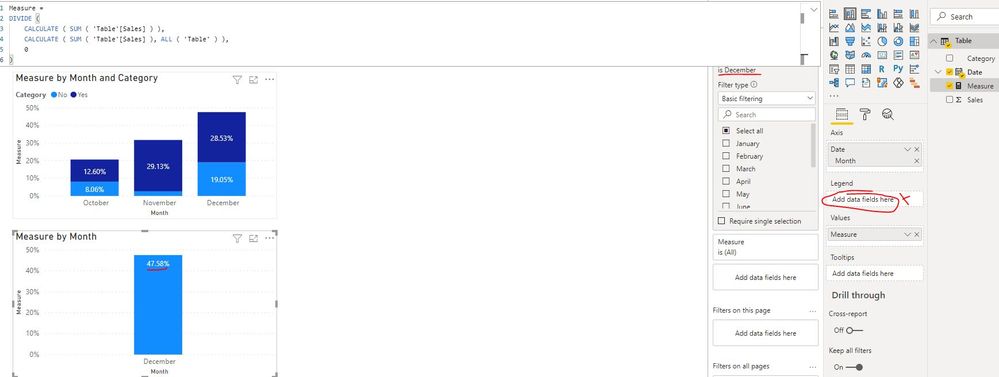
In addition, I created a sample pbix file(see attachment) for you. Please check whether that is what you want.

Visual Help.JPG

Best Regards

Helpful resources

Announcements
Power BI DataViz World Championships

Power BI Dataviz World Championships

The Power BI Data Visualization World Championships is back! It's time to submit your entry.

January Power BI Update Carousel

Power BI Monthly Update - January 2026

Check out the January 2026 Power BI update to learn about new features.

FabCon Atlanta 2026 carousel

FabCon Atlanta 2026

Join us at FabCon Atlanta, March 16-20, for the ultimate Fabric, Power BI, AI and SQL community-led event. Save $200 with code FABCOMM.