Share feedback directly with Fabric product managers, participate in targeted research studies and influence the Fabric roadmap.
Sign up nowGet Fabric certified for FREE! Don't miss your chance! Learn more
Hi,
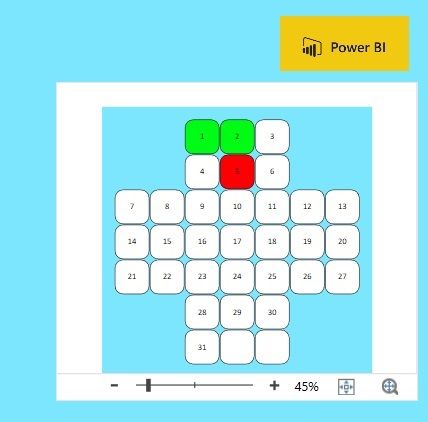
I am using a Visio Visualisation on some report and I would like to hide the lower part ( Zoom part ) and be able to choose the color behind the Visio image ( white just now ). I have to create lots of cubes with the right color to hide all that, is there a better way to do it?
Thanks.
Solved! Go to Solution.
Hi @ManuSwe ,
Based on my test,it's not supported to make the zoom part invisible currently,you may contact the author via his mail address : tellvisio@microsoft.com to propose your idea.
Best Regards,
Kelly
Did I answer your question? Mark my post as a solution!
Hi, thanks for your answer, I will provide 2 picture so you can see what I am looking for, on the pictures you will see the "Green cross" that visualize the incident and the accident at a working place. This Visualization is shown on a TV, so the way it looks is quite important. The first picture shows how it is now, and the second how I want it, without the white part around and without the Zoom part under. I can fix it with 4 blue square that I adjust around to hide the white parts but it takes time to adjust to get it perfect so I was looking for this solution direct from the Visio Visualization.
How it looks like.
How I want it.
Hi @ManuSwe ,
Based on my test,it's not supported to make the zoom part invisible currently,you may contact the author via his mail address : tellvisio@microsoft.com to propose your idea.
Best Regards,
Kelly
Did I answer your question? Mark my post as a solution!
Hi @ManuSwe ,
Pls check the video below:
https://www.youtube.com/watch?v=qeABEazVUaY
Best Regards,
Kelly
Did I answer your question? Mark my post as a solution!
If you love stickers, then you will definitely want to check out our Community Sticker Challenge!
Check out the January 2026 Power BI update to learn about new features.
| User | Count |
|---|---|
| 65 | |
| 65 | |
| 45 | |
| 21 | |
| 18 |
| User | Count |
|---|---|
| 115 | |
| 114 | |
| 38 | |
| 36 | |
| 26 |