Learn from the best! Meet the four finalists headed to the FINALS of the Power BI Dataviz World Championships! Register now
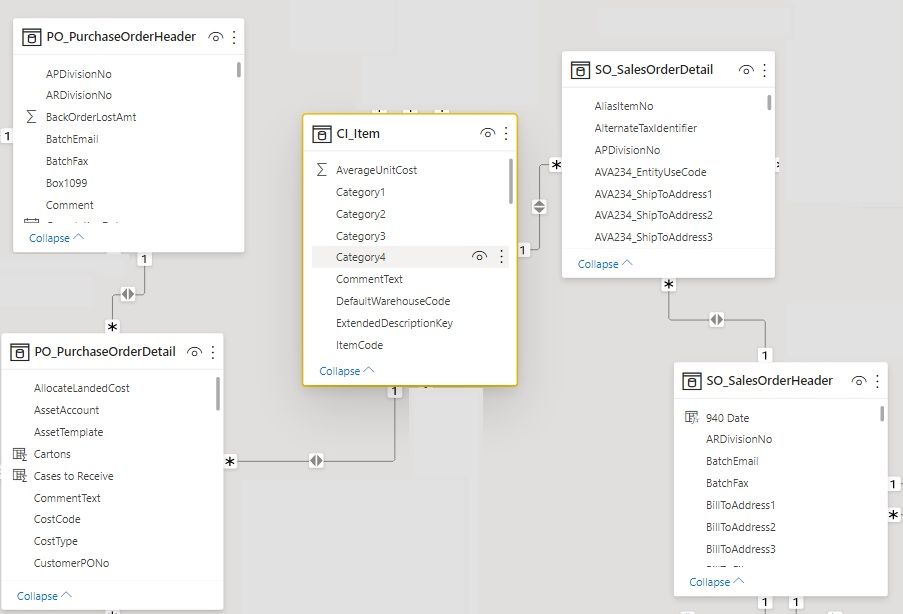
I have an ERD of items (CI_Item) that are contained both in Sales Orders and Purchase Orders, essentially linking them through an item code, creating an indirect many to many relationship (which is expected). This issue I'm having in my report is I have a single table that lists item info and the Sales Orders and Purchase Orders that they are on, and all items are being listed as having both an associated sales and purchase order. I know there are items out there on sales orders that do not have a purchase order. There is no "Blank" values showing up for purchase orders, so I was wondering what can I adjust in the relationships or visuals to show these?
Solved! Go to Solution.
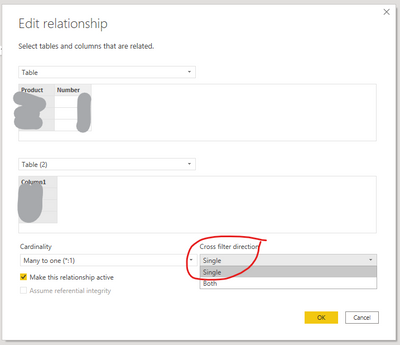
From the diagram you provided, the relationships are one-to-many and not many-to-many which is how they are supposed to be. I believe your problem is not with the relationships but with the "Filter Direction". You should change the "Filter Direction" to One and then make sure the fields in the visual are set to "Show items with no data":
Thanks! It looks like that "Show items with no data" has resolved it. I did not have that checked on the PO field in my visual.
If you have recently started exploring Fabric, we'd love to hear how it's going. Your feedback can help with product improvements.
A new Power BI DataViz World Championship is coming this June! Don't miss out on submitting your entry.
Share feedback directly with Fabric product managers, participate in targeted research studies and influence the Fabric roadmap.
| User | Count |
|---|---|
| 57 | |
| 38 | |
| 33 | |
| 19 | |
| 16 |
| User | Count |
|---|---|
| 68 | |
| 66 | |
| 41 | |
| 34 | |
| 24 |