Join us at FabCon Atlanta from March 16 - 20, 2026, for the ultimate Fabric, Power BI, AI and SQL community-led event. Save $200 with code FABCOMM.
Register now!The Power BI Data Visualization World Championships is back! Get ahead of the game and start preparing now! Learn more
Hello wonderful forum users!
Next on my task list is to create a report with a toggle to view metrics by a different unit. For example, imagine you have a pivot table with Resources being the rows and Week Numbers being the columns. I may want the values in the center to be billed hours, non-billed hours, total hours, or billed dollars. I'd be ok if the toggle was limited to just two (off/on) though.
In researching this it seems one method is to use bookmarks where I essentially have to make multiple copies of the table overlapping each other. However, is that really the only option available? It seems a bit overly complex for such a straight forward requirement.
Solved! Go to Solution.
Hi @Anonymous ,
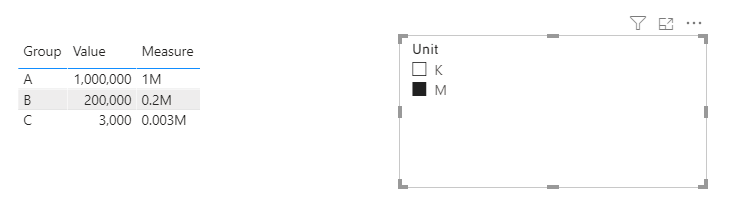
To view metrics by a different unit, maybe you can create a new table including the unit, for example, thousand, million...and put this column in a silcer, create a measure like this:
Measure =
var uint = SELECTEDVALUE(test[Unit])
return
IF(
uint = "K",
DIVIDE(SELECTEDVALUE('Table'[Value]),1000) & "K",
IF(
uint = "M",
DIVIDE(SELECTEDVALUE('Table'[Value]),1000000) & "M"
)
)This is just a sample, you can refer it depending on your specific situations.
Best Regards,
Yingjie Li
If this post helps then please consider Accept it as the solution to help the other members find it more quickly.
Hi @Anonymous ,
To view metrics by a different unit, maybe you can create a new table including the unit, for example, thousand, million...and put this column in a silcer, create a measure like this:
Measure =
var uint = SELECTEDVALUE(test[Unit])
return
IF(
uint = "K",
DIVIDE(SELECTEDVALUE('Table'[Value]),1000) & "K",
IF(
uint = "M",
DIVIDE(SELECTEDVALUE('Table'[Value]),1000000) & "M"
)
)This is just a sample, you can refer it depending on your specific situations.
Best Regards,
Yingjie Li
If this post helps then please consider Accept it as the solution to help the other members find it more quickly.
@v-yingjl this is genius!!! A little "hacky", and honestly way more effort than it should be, but still I like the creativity of it!
@Anonymous , did not get it completely
Refer
Dynamically change chart axis in Power BI
https://www.youtube.com/watch?v=6jeSIRpjv0M
https://radacad.com/bookmarks-and-buttons-making-power-bi-charts-even-more-interactive
The Power BI Data Visualization World Championships is back! Get ahead of the game and start preparing now!
| User | Count |
|---|---|
| 41 | |
| 39 | |
| 37 | |
| 29 | |
| 24 |
| User | Count |
|---|---|
| 119 | |
| 100 | |
| 72 | |
| 69 | |
| 65 |