FabCon is coming to Atlanta
Join us at FabCon Atlanta from March 16 - 20, 2026, for the ultimate Fabric, Power BI, AI and SQL community-led event. Save $200 with code FABCOMM.
Register now!- Power BI forums
- Get Help with Power BI
- Desktop
- Service
- Report Server
- Power Query
- Mobile Apps
- Developer
- DAX Commands and Tips
- Custom Visuals Development Discussion
- Health and Life Sciences
- Power BI Spanish forums
- Translated Spanish Desktop
- Training and Consulting
- Instructor Led Training
- Dashboard in a Day for Women, by Women
- Galleries
- Data Stories Gallery
- Themes Gallery
- Contests Gallery
- QuickViz Gallery
- Quick Measures Gallery
- Visual Calculations Gallery
- Notebook Gallery
- Translytical Task Flow Gallery
- TMDL Gallery
- R Script Showcase
- Webinars and Video Gallery
- Ideas
- Custom Visuals Ideas (read-only)
- Issues
- Issues
- Events
- Upcoming Events
The Power BI Data Visualization World Championships is back! Get ahead of the game and start preparing now! Learn more
- Power BI forums
- Forums
- Get Help with Power BI
- Desktop
- Re: View full screen in power bi desktop
- Subscribe to RSS Feed
- Mark Topic as New
- Mark Topic as Read
- Float this Topic for Current User
- Bookmark
- Subscribe
- Printer Friendly Page

- Mark as New
- Bookmark
- Subscribe
- Mute
- Subscribe to RSS Feed
- Permalink
- Report Inappropriate Content
View full screen in power bi desktop
Hi, I am using Power BI desktop on a Surface Pro 4. I want to demo some dashboards in full screen. I cannot find how this is supposed to be done. I want literally just my dashboard and nothing else. The surface has a beautiful display and I want to maximise the wow factor for my customers. Showing design menus is just visual clutter. Please help!
Thanks
Jamie
Solved! Go to Solution.


- Mark as New
- Bookmark
- Subscribe
- Mute
- Subscribe to RSS Feed
- Permalink
- Report Inappropriate Content
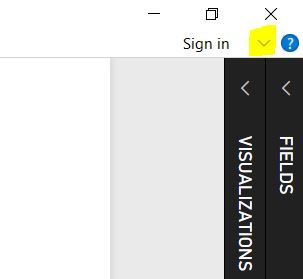
The best you will get is by minimising the 'fields' and 'visualisation' panes, and clicking the little icon in the in the corner next to sign in (see image below).
Also ensure the 'view' on your report is set to 'fit to page' or 'fit to width'.
Let me know how you get on.
Cheers
shebr
- Mark as New
- Bookmark
- Subscribe
- Mute
- Subscribe to RSS Feed
- Permalink
- Report Inappropriate Content
Hiya Shebr,
That is way better, especially if I hide the ribbon. I would still rather the Fields and Visualisations panes could be got rid of entirely - but this is close enough! Thank you.

- Mark as New
- Bookmark
- Subscribe
- Mute
- Subscribe to RSS Feed
- Permalink
- Report Inappropriate Content
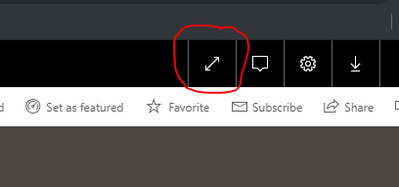
if you are on the Dashboard there is Full screen option
- Mark as New
- Bookmark
- Subscribe
- Mute
- Subscribe to RSS Feed
- Permalink
- Report Inappropriate Content
The best you will get is by minimising the 'fields' and 'visualisation' panes, and clicking the little icon in the in the corner next to sign in (see image below).
Also ensure the 'view' on your report is set to 'fit to page' or 'fit to width'.
Let me know how you get on.
Cheers
shebr
- Mark as New
- Bookmark
- Subscribe
- Mute
- Subscribe to RSS Feed
- Permalink
- Report Inappropriate Content
Having the June 2018 version, I do not see that drop-down arrow next to Sign in. Any reason why this is?
- Mark as New
- Bookmark
- Subscribe
- Mute
- Subscribe to RSS Feed
- Permalink
- Report Inappropriate Content
HI @Anonymous ,
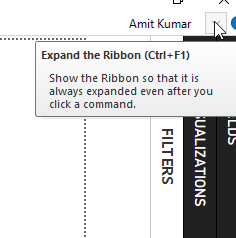
The latest power BI verison is Feb 2019. You can update your Power BI desktop.
As I can see arrow in Feb-2019 Power BI desktop version.
You can try Ctrl+F1 to see to see full screen in Power BI desktop.
Also, see my screenshot below.
- Mark as New
- Bookmark
- Subscribe
- Mute
- Subscribe to RSS Feed
- Permalink
- Report Inappropriate Content
Hiya Shebr,
That is way better, especially if I hide the ribbon. I would still rather the Fields and Visualisations panes could be got rid of entirely - but this is close enough! Thank you.
- Mark as New
- Bookmark
- Subscribe
- Mute
- Subscribe to RSS Feed
- Permalink
- Report Inappropriate Content
As a footnote - an alternative method is to download the Power BI Mobile App, which will allow a full screen view.
Helpful resources

Power BI Dataviz World Championships
The Power BI Data Visualization World Championships is back! Get ahead of the game and start preparing now!

Power BI Monthly Update - December 2025
Check out the December 2025 Power BI Holiday Recap!

FabCon Atlanta 2026
Join us at FabCon Atlanta, March 16-20, for the ultimate Fabric, Power BI, AI and SQL community-led event. Save $200 with code FABCOMM.

| User | Count |
|---|---|
| 41 | |
| 39 | |
| 37 | |
| 29 | |
| 24 |


| User | Count |
|---|---|
| 119 | |
| 100 | |
| 72 | |
| 69 | |
| 65 |


