Don't miss your chance to take the Fabric Data Engineer (DP-600) exam for FREE! Find out how by watching the DP-600 session on-demand now through April 28th.
Learn moreJoin the FabCon + SQLCon recap series. Up next: Power BI, Real-Time Intelligence, IQ and AI, and Data Factory take center stage. All sessions are available on-demand after the live show. Register now
Hi All
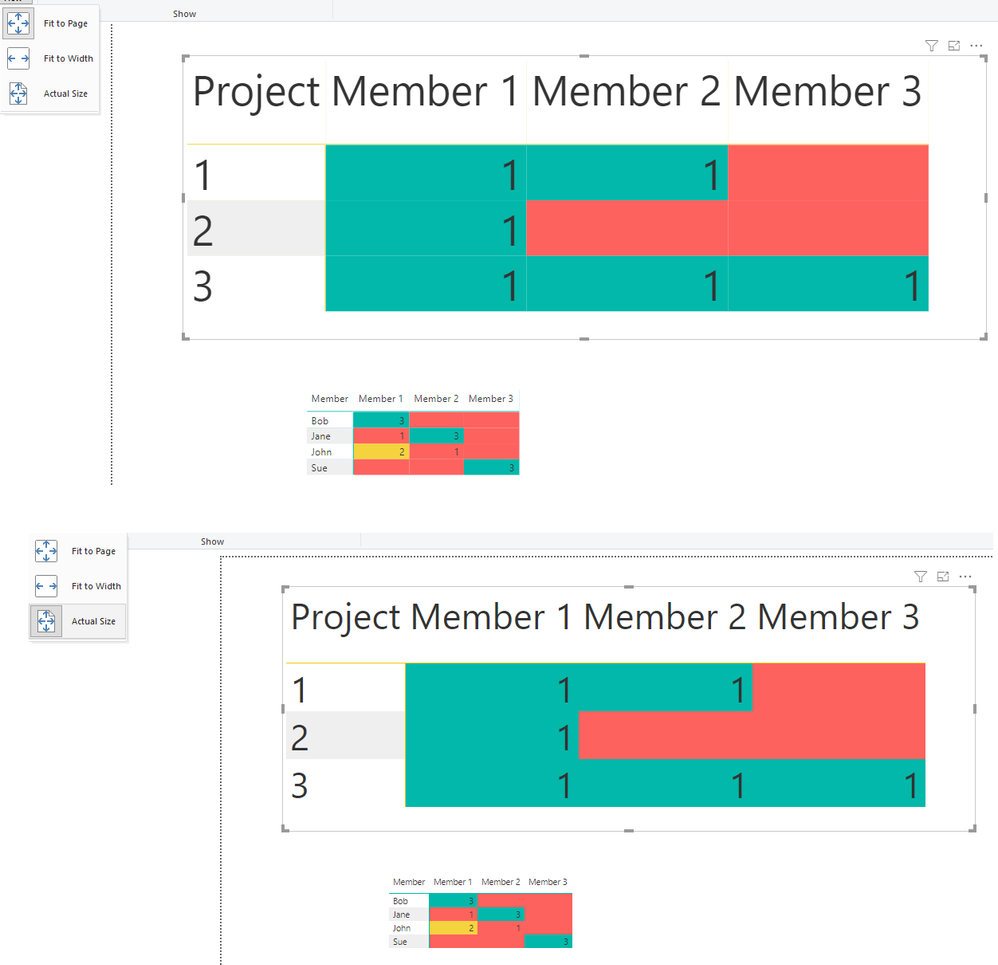
I have a table visual with some conditional formatting in different columns. I have turned off the vertical grid in the table but it keeps giving a vertical line as can be seen here:
So altough the grid is off there seems to be a small vertical line still? Does someone know how I can delete that line?
Best regards,
Gijs
Solved! Go to Solution.
Hi @Anonymous ,
Before publishing set you your report to Actual size and then publish it that should work as expected.
Regards,
MFelix
Regards
Miguel Félix
Proud to be a Super User!
Check out my blog: Power BI em PortuguêsHi @Anonymous ,
That as to do with the changes of colour and size when changing from the fit to page view to the actual size the lines disappear, at least in my computer.
Try to publish the report and check if the online service you also see the lines.
Regards,
MFelix
Regards
Miguel Félix
Proud to be a Super User!
Check out my blog: Power BI em Português@MFelix It seems to be that you are right. When I publish my report for some reason the setting in Internet Explorer is 'Actual size' automatically and in Google Chrome it is fit to width. Do you now wether I can change a setting somewhere in My report so that people will see it automatically as 'Actual size'? Since the published report also shows the lines when it is not actual size and I would like it to not show the lines when someone views the report.
Hi @Anonymous ,
Before publishing set you your report to Actual size and then publish it that should work as expected.
Regards,
MFelix
Regards
Miguel Félix
Proud to be a Super User!
Check out my blog: Power BI em PortuguêsThanks, that works indeed.
Regards,
Gijs
Check out the April 2026 Power BI update to learn about new features.
If you have recently started exploring Fabric, we'd love to hear how it's going. Your feedback can help with product improvements.
A new Power BI DataViz World Championship is coming this June! Don't miss out on submitting your entry.
| User | Count |
|---|---|
| 43 | |
| 38 | |
| 35 | |
| 21 | |
| 15 |
| User | Count |
|---|---|
| 63 | |
| 58 | |
| 28 | |
| 27 | |
| 25 |