cancel
Showing results for 
Search instead for 
Did you mean: 

Get Fabric Certified for FREE during Fabric Data Days. Don't miss your chance! Request now

Reply
Anonymous
Not applicable

Vertical Bar chart showing numbers in Billions when published to a workspace

I have created a Vertical Bar Chart with a Dimension and a measure. 

The display units is set to 'Auto' , since the sheet contains so many other filters. 

It is showing the numbers correctly in 'Millions' when in PowerBI desktop.

However when it is published to a Workspace (Organizational) and then published to APP it is showing in 'Billions', which is very awkward.

How Can I keep it in Millions itself.


1 ACCEPTED SOLUTION
v-danhe-msft
Microsoft Employee
Microsoft Employee

Hi @Anonymous ,

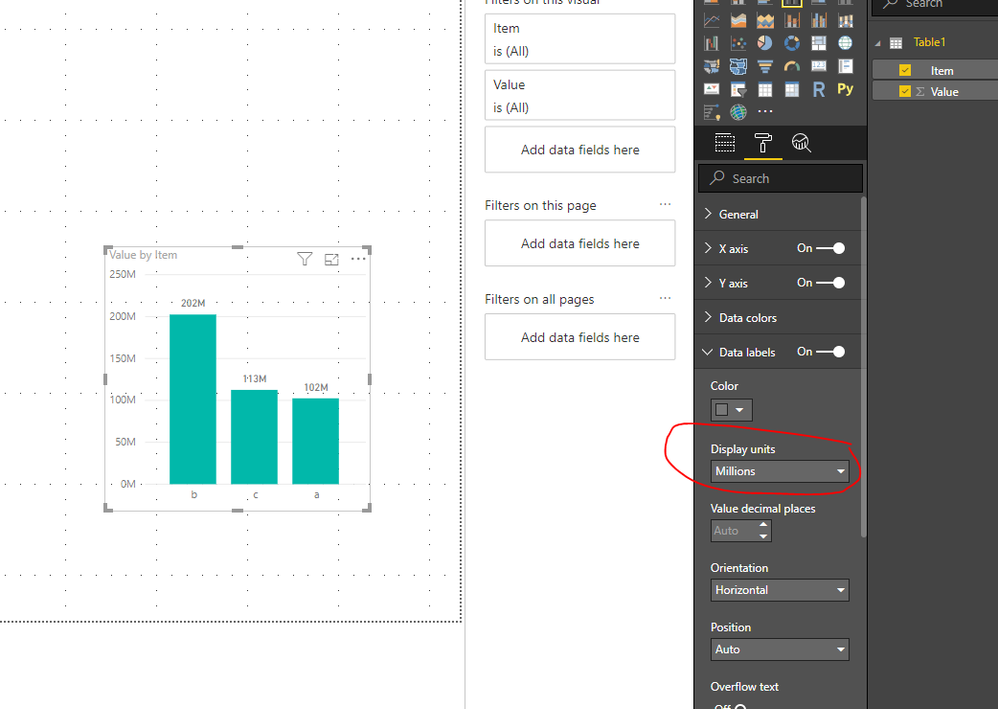
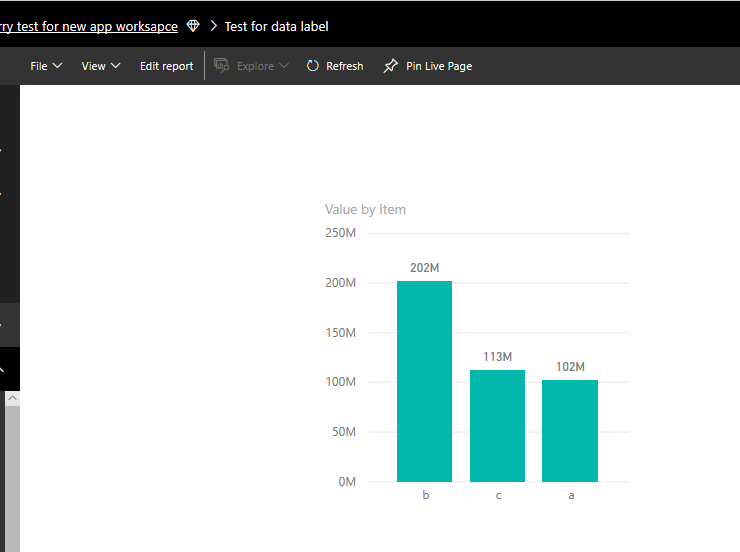
You could set the Display uints as million and it could work on my side:

Desktop:

1.PNG

Service:

2.PNG

Regards,

Daniel He

Community Support Team _ Daniel He
If this post helps, then please consider Accept it as the solution to help the other members find it more quickly.

View solution in original post

2 REPLIES 2
v-danhe-msft
Microsoft Employee
Microsoft Employee

Hi @Anonymous ,

You could set the Display uints as million and it could work on my side:

Desktop:

1.PNG

Service:

2.PNG

Regards,

Daniel He

Community Support Team _ Daniel He
If this post helps, then please consider Accept it as the solution to help the other members find it more quickly.
Anonymous
Not applicable

By default it should show 'Millions'. [ Prsently it is in Billions ]

however It should be set as 'Auto'., since there are so many dropdown filter visuals in this sheet. hence based on the selection the units should show Millions, or Thousands etc..


If we set it to Millions, even in the granular level of filtering it will show 0.00M which may not be accurate.


In any case it should not show Billions, since the figures are not high enough to display it as Billions.

Helpful resources

Announcements
November Power BI Update Carousel

Power BI Monthly Update - November 2025

Check out the November 2025 Power BI update to learn about new features.

Fabric Data Days Carousel

Fabric Data Days

Advance your Data & AI career with 50 days of live learning, contests, hands-on challenges, study groups & certifications and more!

FabCon Atlanta 2026 carousel

FabCon Atlanta 2026

Join us at FabCon Atlanta, March 16-20, for the ultimate Fabric, Power BI, AI and SQL community-led event. Save $200 with code FABCOMM.

Top Solution Authors
Top Kudoed Authors