Join us at FabCon Atlanta from March 16 - 20, 2026, for the ultimate Fabric, Power BI, AI and SQL community-led event. Save $200 with code FABCOMM.
Register now!Learn from the best! Meet the four finalists headed to the FINALS of the Power BI Dataviz World Championships! Register now
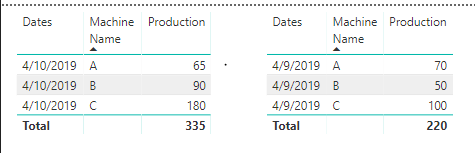
I have two visuals that I want to merger and show the delta between today's production vs yesterday's production?
However, I'm struggling to write the DAX formula to show the delta by day in one colume called "Today vs Yesterday? Please note the Production info is a measure that was calculated using the sum of machines A, B, C.
Any help would be appreciated.
Solved! Go to Solution.
Hi @Anonymous
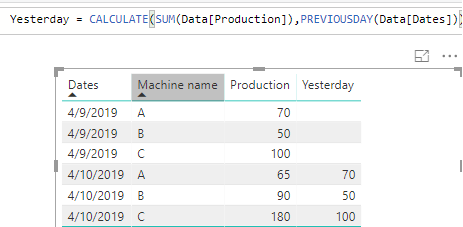
You may remove .[Date] of the formula.For example:
Yesterday = CALCULATE(SUM(Data[Production]),PREVIOUSDAY(Data[Dates]))
Regards,
@Anonymous to get "yesterday" means to change the Filter Context of an expression.
So, you could have a Measure like this:
Production Sum = SUM(<yourtable>[Production])
And a second Measure like this (Note: The 2nd argument of CALCULATE changes Date Filter from the day being analyzed to the day before):
Product Sum Yesterday = CALCULATE([Production Sum], PREVIOUSDAY(<yourtable>'[Dates].[Date]))
And a third Measure like this:
Today vs Yesterday = [Production Sum] - [Production Sum Yesterday]
You could combine the code into a single measure, but the first 2 may be beneficial as well.
Cheers!
Nathan
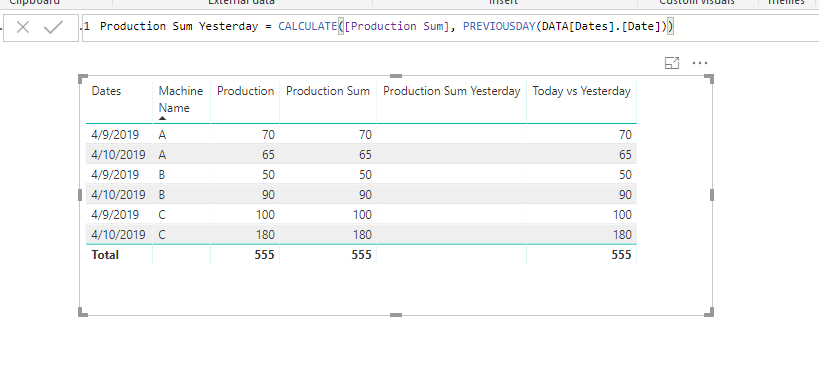
I tried the formula but the "Production Sum Yesterday" measure didn't work. Can you have a look?
Hi @Anonymous -
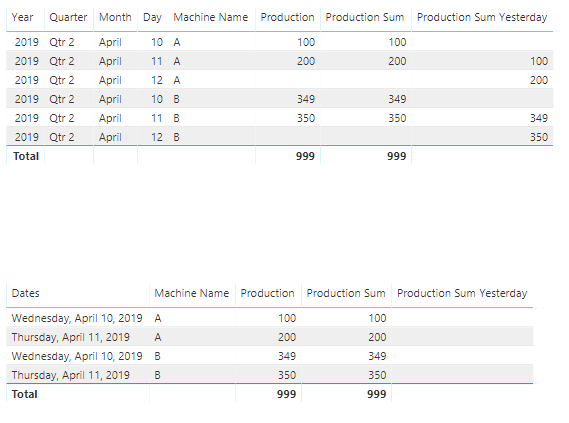
It will work if you expand the date. Unfortunately, it doesn't look very good. Another approach is to add a separate date table. There are many scripts available to create one in DAX or M (Power Query).
Cheers!
Nathan
Yeah - it doesn't look user-friendly in the current format.
Hi @Anonymous
You may remove .[Date] of the formula.For example:
Yesterday = CALCULATE(SUM(Data[Production]),PREVIOUSDAY(Data[Dates]))
Regards,
Share feedback directly with Fabric product managers, participate in targeted research studies and influence the Fabric roadmap.
Check out the February 2026 Power BI update to learn about new features.
| User | Count |
|---|---|
| 53 | |
| 51 | |
| 36 | |
| 15 | |
| 14 |
| User | Count |
|---|---|
| 92 | |
| 75 | |
| 41 | |
| 26 | |
| 25 |