Share feedback directly with Fabric product managers, participate in targeted research studies and influence the Fabric roadmap.
Sign up nowGet Fabric certified for FREE! Don't miss your chance! Learn more
Hi there!
I have a column of usage and want to calculate the difference as shown in this table of my data:
| Date | Usage | Crew | Difference |
| 1/1/2018 | 1 | a | |
| 1/7/2018 | 2 | a | -1 |
| 1/1/2018 | 1 | b | |
| 1/2/2018 | 5 | b | -4 |
| 1/1/2018 | 5 | c | |
| 1/6/2018 | 15 | c | -10 |
| 1/9/2018 | 8 | a | |
| 1/10/2018 | 10 | a | -2 |
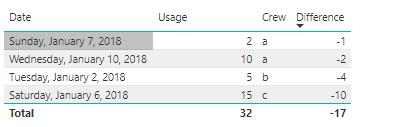
However, I want this as a DAX measure so when I make a table visual it comes out like so:
| Date | Usage | Crew | Difference |
| 1/7/2018 | 2 | a | -1 |
| 1/2/2018 | 5 | b | -4 |
| 1/6/2018 | 15 | c | -10 |
| 1/10/2018 | 10 | a | -2 |
Any help is apreciated!
Solved! Go to Solution.
Hi @Anonymous,
Please check out the demo in the attachment.
1. Add an index.
2. Add a custom column in the Query Editor.
if [Index] = 1 then 1 else if #"Added Index"{[Index] - 2}[Crew] = [Crew] then [Index] - 1 else [Index]
3. Create two measures.
UsageMeasure =
CALCULATE (
SUM ( Table1[Usage] ),
FILTER ( 'Table1', 'Table1'[Date] = MAX ( 'Table1'[Date] ) )
)
Measure =
VAR firstValue =
CALCULATE (
SUM ( Table1[Usage] ),
FILTER ( 'Table1', 'Table1'[Date] = MIN ( 'Table1'[Date] ) )
)
VAR secondValue =
CALCULATE (
SUM ( Table1[Usage] ),
FILTER ( 'Table1', 'Table1'[Date] = MAX ( 'Table1'[Date] ) )
)
RETURN
firstValue - secondValue
Best Regards,
Dale
Hi @Anonymous,
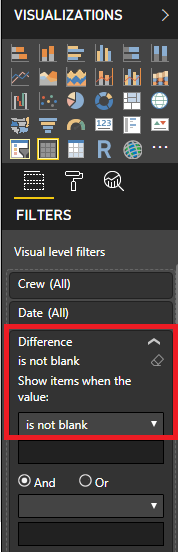
If you have the data in the table as showin the 1st table in your post. Then you can get the result without creating a measure.
Simply add the fields to a table visual and in the "Visual level Filter" apply a filter to the Difference column as 'Is not blank'
For further reference you can access the pbix file below.
https://www.dropbox.com/s/k1rb4w9n0ibf0df/Difference%20nblank.pbix?dl=0
Please mark this post as an accepted solution if this helped you.
Regards,
Affan
Thank you for your reply @affan, No, I do not have the data shown in the first table. I am trying to specify that the difference needs to be linked to the second crew value when calculated via measure
Hi @Anonymous,
Please check out the demo in the attachment.
1. Add an index.
2. Add a custom column in the Query Editor.
if [Index] = 1 then 1 else if #"Added Index"{[Index] - 2}[Crew] = [Crew] then [Index] - 1 else [Index]
3. Create two measures.
UsageMeasure =
CALCULATE (
SUM ( Table1[Usage] ),
FILTER ( 'Table1', 'Table1'[Date] = MAX ( 'Table1'[Date] ) )
)
Measure =
VAR firstValue =
CALCULATE (
SUM ( Table1[Usage] ),
FILTER ( 'Table1', 'Table1'[Date] = MIN ( 'Table1'[Date] ) )
)
VAR secondValue =
CALCULATE (
SUM ( Table1[Usage] ),
FILTER ( 'Table1', 'Table1'[Date] = MAX ( 'Table1'[Date] ) )
)
RETURN
firstValue - secondValue
Best Regards,
Dale
If you love stickers, then you will definitely want to check out our Community Sticker Challenge!
Check out the January 2026 Power BI update to learn about new features.
| User | Count |
|---|---|
| 64 | |
| 63 | |
| 48 | |
| 21 | |
| 18 |
| User | Count |
|---|---|
| 119 | |
| 117 | |
| 38 | |
| 36 | |
| 27 |