Join us at FabCon Atlanta from March 16 - 20, 2026, for the ultimate Fabric, Power BI, AI and SQL community-led event. Save $200 with code FABCOMM.
Register now!The Power BI Data Visualization World Championships is back! Get ahead of the game and start preparing now! Learn more
Hello,
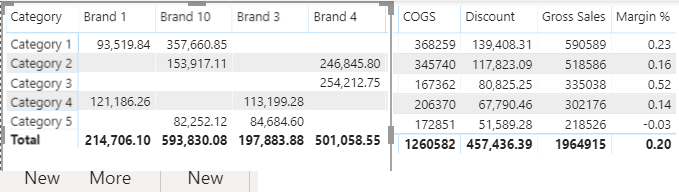
I have 3 measures that I want to show by version (actual and plan), so I use the version as a column and use those 3 measures as values. I need to add columns of variances between actual and plan on the 3 measures. I tried enabling Column Subtotals in the format setting to see if I can change that to variance instead of sum but seems no luck. If I write 3 variance measures and add them to Values section, they will show up under both actual and plan headers and also give wrong values. I want the view as shown below just change Total to variance. Any suggestions would be greatly appreciated 😊
@ttt , if you want to show variance only under the total , that is not possible. You have add it as a measure and it will repeat.
I have logged an idea for hybrid table, vote for that. https://ideas.powerbi.com/forums/265200-power-bi-ideas/suggestions/39773011-hybrid-table
Thanks @amitchandak! I couldn't click on a vote button for some reason.
Another way I can think of is to create 9 measures: reduction, in-quarter savings and annualized savings for actual, plan and variance but I also want double heading to make the data easy to digest. Do you know if it's possible to customize the header that way? Thank you so much!
The Power BI Data Visualization World Championships is back! Get ahead of the game and start preparing now!
| User | Count |
|---|---|
| 38 | |
| 38 | |
| 37 | |
| 28 | |
| 28 |
| User | Count |
|---|---|
| 124 | |
| 89 | |
| 73 | |
| 66 | |
| 65 |