FabCon is coming to Atlanta
Join us at FabCon Atlanta from March 16 - 20, 2026, for the ultimate Fabric, Power BI, AI and SQL community-led event. Save $200 with code FABCOMM.
Register now!- Power BI forums
- Get Help with Power BI
- Desktop
- Service
- Report Server
- Power Query
- Mobile Apps
- Developer
- DAX Commands and Tips
- Custom Visuals Development Discussion
- Health and Life Sciences
- Power BI Spanish forums
- Translated Spanish Desktop
- Training and Consulting
- Instructor Led Training
- Dashboard in a Day for Women, by Women
- Galleries
- Data Stories Gallery
- Themes Gallery
- Contests Gallery
- QuickViz Gallery
- Quick Measures Gallery
- Visual Calculations Gallery
- Notebook Gallery
- Translytical Task Flow Gallery
- TMDL Gallery
- R Script Showcase
- Webinars and Video Gallery
- Ideas
- Custom Visuals Ideas (read-only)
- Issues
- Issues
- Events
- Upcoming Events
Get Fabric Certified for FREE during Fabric Data Days. Don't miss your chance! Request now
- Power BI forums
- Forums
- Get Help with Power BI
- Desktop
- Re: Value estimation based on working days
- Subscribe to RSS Feed
- Mark Topic as New
- Mark Topic as Read
- Float this Topic for Current User
- Bookmark
- Subscribe
- Printer Friendly Page


- Mark as New
- Bookmark
- Subscribe
- Mute
- Subscribe to RSS Feed
- Permalink
- Report Inappropriate Content
Value estimation based on working days
Dear Community
I need a measure which can estimate the month expected volume
When yesterday was a holiday, there is no value for the WorkingDayCount for the previous date. As a result, the formula returns the value of infinity. How to make the formula take the last non-empty value WorkingDayCount?
Table Calendar
| LINK_Date | WeekDayName | WorkingDayCount |
| 1-May-19 | Wednesday | |
| 2-May-19 | Thursday | 1 |
| 3-May-19 | Friday | |
| 4-May-19 | Saturday | |
| 5-May-19 | Sunday | |
| 6-May-19 | Monday | 2 |
| 7-May-19 | Tuesday | 3 |
| 8-May-19 | Wednesday | 4 |
| 9-May-19 | Thursday | 5 |
| 10-May-19 | Friday | 6 |
| 11-May-19 | Saturday | |
| 12-May-19 | Sunday | |
| 13-May-19 | Monday | 7 |
| 14-May-19 | Tuesday | 8 |
| 15-May-19 | Wednesday | 9 |
| 16-May-19 | Thursday | 10 |
| 17-May-19 | Friday | 11 |
| 18-May-19 | Saturday | |
| 19-May-19 | Sunday | |
| 20-May-19 | Monday | 12 |
| 21-May-19 | Tuesday | 13 |
| 22-May-19 | Wednesday | 14 |
| 23-May-19 | Thursday | 15 |
| 24-May-19 | Friday | 16 |
| 25-May-19 | Saturday | |
| 26-May-19 | Sunday | |
| 27-May-19 | Monday | 17 |
| 28-May-19 | Tuesday | 18 |
| 29-May-19 | Wednesday | 19 |
| 30-May-19 | Thursday | 20 |
| 31-May-19 | Friday | 21 |


- Mark as New
- Bookmark
- Subscribe
- Mute
- Subscribe to RSS Feed
- Permalink
- Report Inappropriate Content
@slyfox change your total working days measure like this
Total Working Days =
CALCULATE(
    MAX( Table2[WorkingDayCount] ),
    FILTER(
        ALL( Table2),
        Table2[LINK_Date  ] <= MAX( Table2[LINK_Date  ] ) &&
        NOT ISBLANK( Table2[WorkingDayCount] )
    )
)
Subscribe to the @PowerBIHowTo YT channel for an upcoming video on List and Record functions in Power Query!!
Learn Power BI and Fabric - subscribe to our YT channel - Click here: @PowerBIHowTo
If my solution proved useful, I'd be delighted to receive Kudos. When you put effort into asking a question, it's equally thoughtful to acknowledge and give Kudos to the individual who helped you solve the problem. It's a small gesture that shows appreciation and encouragement! ❤
Did I answer your question? Mark my post as a solution. Proud to be a Super User! Appreciate your Kudos 🙂
Feel free to email me with any of your BI needs.
- Mark as New
- Bookmark
- Subscribe
- Mute
- Subscribe to RSS Feed
- Permalink
- Report Inappropriate Content
Hello @parry2k
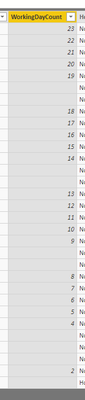
An issue with blank values at WorkingDayCount column. I need to have adjusted Column Working Days Count in a way to fill empty rows with a previous day.
For example, Saturday and Sunday have to be with Friday's value.
WorkingDayCount =
Var __CurrentDate   = D_Date[DATE_Date]
Var __CurrentMonth  = D_Date[DATE_MonthName]
Var __CurrentYear   = YEAR( D_Date[DATE_Date] )
Var __CurrentDay    = D_Date[DATE_WeekdayName]
Var __List          = {"Saturday" , "Sunday" }
Var __ListHolidays  = {
                        DATE(YEAR(TODAY()),1,1),
                        DATE(YEAR(TODAY()),1,6),
                        DATE(YEAR(TODAY()),4,21),
                        DATE(YEAR(TODAY()),4,22),
                        DATE(YEAR(TODAY()),5,1),
                        DATE(YEAR(TODAY()),5,3),
                        DATE(YEAR(TODAY()),6,9),
                        DATE(YEAR(TODAY()),6,20),
                        DATE(YEAR(TODAY()),8,15),
                        DATE(YEAR(TODAY()),11,1),
                        DATE(YEAR(TODAY()),11,11),
                        DATE(YEAR(TODAY()),12,25),
                        DATE(YEAR(TODAY()),12,26)
                        }
RETURN

CALCULATE(
    COUNTROWS( D_Date ),
    Filter(
        ALL( D_Date),
        __CurrentDate >= D_Date[DATE_Date]
        && NOT D_Date[DATE_WeekdayName] IN __List
        && NOT __CurrentDay             IN __List
        && NOT __CurrentDate            IN __ListHolidays
        && __CurrentMonth               = D_Date[DATE_MonthName]
        && __CurrentYear                = Year( D_Date[DATE_Date])
)
- Mark as New
- Bookmark
- Subscribe
- Mute
- Subscribe to RSS Feed
- Permalink
- Report Inappropriate Content
@slyfox did you checked the solution I provided. It is exactly doing the same you asked for, if there is no working day count, it is giving previous day working day count, in case of sat/sun, it will give working days of Friday.
Subscribe to the @PowerBIHowTo YT channel for an upcoming video on List and Record functions in Power Query!!
Learn Power BI and Fabric - subscribe to our YT channel - Click here: @PowerBIHowTo
If my solution proved useful, I'd be delighted to receive Kudos. When you put effort into asking a question, it's equally thoughtful to acknowledge and give Kudos to the individual who helped you solve the problem. It's a small gesture that shows appreciation and encouragement! ❤
Did I answer your question? Mark my post as a solution. Proud to be a Super User! Appreciate your Kudos 🙂
Feel free to email me with any of your BI needs.
- Mark as New
- Bookmark
- Subscribe
- Mute
- Subscribe to RSS Feed
- Permalink
- Report Inappropriate Content
@slyfox i tested with my sample data and it worked fine, could you please send sample pbix file, remove any sensitive information. you can share it thru onedrive/google drive.
Subscribe to the @PowerBIHowTo YT channel for an upcoming video on List and Record functions in Power Query!!
Learn Power BI and Fabric - subscribe to our YT channel - Click here: @PowerBIHowTo
If my solution proved useful, I'd be delighted to receive Kudos. When you put effort into asking a question, it's equally thoughtful to acknowledge and give Kudos to the individual who helped you solve the problem. It's a small gesture that shows appreciation and encouragement! ❤
Did I answer your question? Mark my post as a solution. Proud to be a Super User! Appreciate your Kudos 🙂
Feel free to email me with any of your BI needs.
- Mark as New
- Bookmark
- Subscribe
- Mute
- Subscribe to RSS Feed
- Permalink
- Report Inappropriate Content
- Mark as New
- Bookmark
- Subscribe
- Mute
- Subscribe to RSS Feed
- Permalink
- Report Inappropriate Content
@slyfox that was to add measure not column, anyhow here is revised DAX
for column use this
Total Working Days as Col =
VAR __Date =
CALCULATE(
    MAX( D_Date[LINK_Date] ),

        D_Date[LINK_Date] <= EARLIER( D_Date[LINK_Date] ) ,
        NOT ISBLANK( D_Date[WorkingDayCount] )

)
RETURN
CALCULATE( SELECTEDVALUE( D_Date[WorkingDayCount] ), D_Date[LINK_Date] = __Date )
for measure us this
Total Working Days as Measure =
VAR __Date =
CALCULATE(
    MAX( D_Date[LINK_Date] ),
    FILTER(
        ALLSELECTED( D_Date ),
        D_Date[LINK_Date] <= MAX( D_Date[LINK_Date] ) &&
        NOT ISBLANK( D_Date[WorkingDayCount] )
    )
)
RETURN
CALCULATE( SELECTEDVALUE( D_Date[WorkingDayCount] ), D_Date[LINK_Date] = __Date )
Subscribe to the @PowerBIHowTo YT channel for an upcoming video on List and Record functions in Power Query!!
Learn Power BI and Fabric - subscribe to our YT channel - Click here: @PowerBIHowTo
If my solution proved useful, I'd be delighted to receive Kudos. When you put effort into asking a question, it's equally thoughtful to acknowledge and give Kudos to the individual who helped you solve the problem. It's a small gesture that shows appreciation and encouragement! ❤
Did I answer your question? Mark my post as a solution. Proud to be a Super User! Appreciate your Kudos 🙂
Feel free to email me with any of your BI needs.
- Mark as New
- Bookmark
- Subscribe
- Mute
- Subscribe to RSS Feed
- Permalink
- Report Inappropriate Content
Hello @parry2k
Column formula returns the wrong value for the first dates of the month, could be possible to adjust it?

- Mark as New
- Bookmark
- Subscribe
- Mute
- Subscribe to RSS Feed
- Permalink
- Report Inappropriate Content

Helpful resources

Power BI Monthly Update - November 2025
Check out the November 2025 Power BI update to learn about new features.

Fabric Data Days
Advance your Data & AI career with 50 days of live learning, contests, hands-on challenges, study groups & certifications and more!

FabCon Atlanta 2026
Join us at FabCon Atlanta, March 16-20, for the ultimate Fabric, Power BI, AI and SQL community-led event. Save $200 with code FABCOMM.


