cancel
Showing results for 
Search instead for 
Did you mean: 

The Power BI Data Visualization World Championships is back! Get ahead of the game and start preparing now! Learn more

Reply

Value Indicator creation for the measure

I have a Column A in a table that has valid values and blank values. I want to create a value indicator measure in power BI. I am not sure how to do it as I am new to Power BI.

in sql we usally do,

case when column A  <> '' then Y

else N


So, How do we implement this in measuire in power BI? Could you please help me out? I am stuck here.

1 ACCEPTED SOLUTION
Anonymous
Not applicable

Hi @rocku2008_1985 ,

Please try below steps:

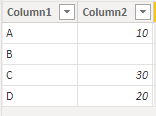
1. below is my test table

Table:

vbinbinyumsft_0-1672387669294.png

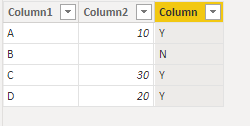
2. create a new column with below dax formula

Column = IF([Column2]<>BLANK(),"Y","N")

vbinbinyumsft_1-1672387750818.png

Please refer the attached .pbix file.


Best regards,
Community Support Team_Binbin Yu
If this post helps, then please consider Accept it as the solution to help the other members find it more quickly.

View solution in original post

5 REPLIES 5
Anonymous
Not applicable

Hi @rocku2008_1985 ,

Please try below steps:

1. below is my test table

Table:

vbinbinyumsft_0-1672387669294.png

2. create a new column with below dax formula

Column = IF([Column2]<>BLANK(),"Y","N")

vbinbinyumsft_1-1672387750818.png

Please refer the attached .pbix file.


Best regards,
Community Support Team_Binbin Yu
If this post helps, then please consider Accept it as the solution to help the other members find it more quickly.

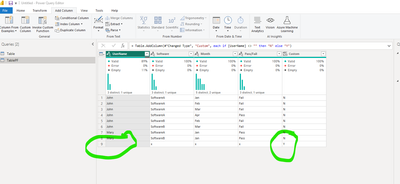
@Nathaniel_C : I did that but I am facing the issues as shown below. The value is blank but if I keeo it blank it gives the issue as shown:


rocku2008_1985_0-1672346541332.png

Could you please help me out?


Hi @rocku2008_1985 
In PQ what type of value is that column?

Nathaniel


Did I answer your question? Mark my post as a solution!

Proud to be a Super User!


Hi @rocku2008_1985 ,
Make sure it is alpha.  Below is what I get.

Nathaniel_C_0-1672358027703.png


Let me know if you have any questions.

If this solves your issues, please mark it as the solution, so that others can find it easily. Kudos 👍are nice too.
Nathaniel


Did I answer your question? Mark my post as a solution!

Proud to be a Super User!


Nathaniel_C
Community Champion
Community Champion

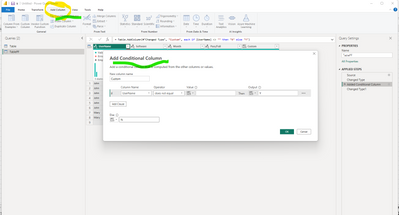
Hi @rocku2008_1985 
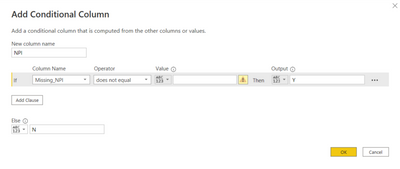
Go to Power Query - Add a Column tab - Conditional Column:

Nathaniel_C_0-1672340880062.png


Let me know if you have any questions.

If this solves your issues, please mark it as the solution, so that others can find it easily. Kudos 👍are nice too.
Nathaniel


Did I answer your question? Mark my post as a solution!

Proud to be a Super User!


Helpful resources

Announcements
Power BI DataViz World Championships

Power BI Dataviz World Championships

The Power BI Data Visualization World Championships is back! Get ahead of the game and start preparing now!

November Power BI Update Carousel

Power BI Monthly Update - November 2025

Check out the November 2025 Power BI update to learn about new features.

FabCon Atlanta 2026 carousel

FabCon Atlanta 2026

Join us at FabCon Atlanta, March 16-20, for the ultimate Fabric, Power BI, AI and SQL community-led event. Save $200 with code FABCOMM.