Join us at FabCon Atlanta from March 16 - 20, 2026, for the ultimate Fabric, Power BI, AI and SQL community-led event. Save $200 with code FABCOMM.
Register now!The Power BI Data Visualization World Championships is back! Get ahead of the game and start preparing now! Learn more
Hello,
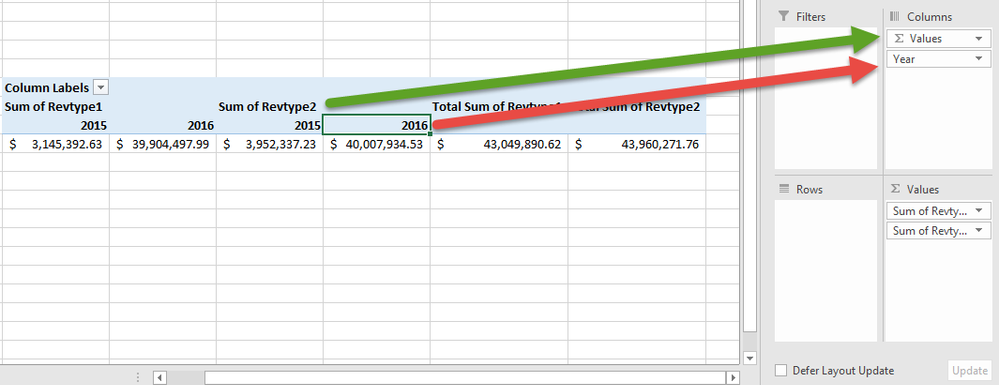
I am creating a table that shows YoY revenue for different lines of business. I have set each LOB to have their own column of revenue information and I want to show that information with 2015 and 2016 next to each other, rather than the buckets sitting under seperate year buckets. I am explaining it poorly so here is the functionality with pivot tables.
Currently my Power BI matrix looks like the pivot table below. My revenue type value headers are below the year, which makes YoY comparisson difficult.
Within pivot tables, I can simply move the order of the column headers so that my years are below the value headers. Is there a similar functionality within Power BI that allows me to put this year header below my value headers?
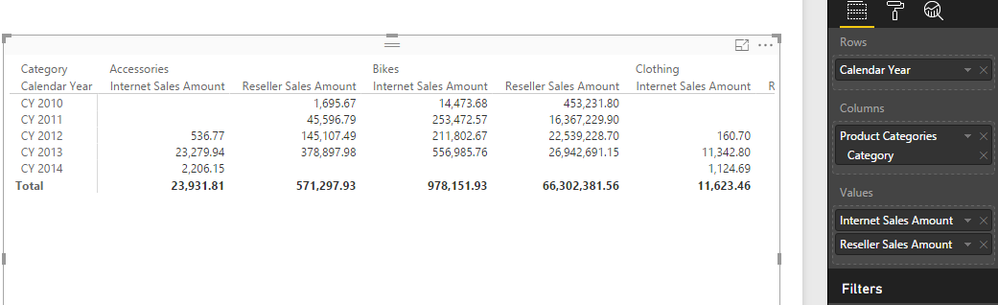
In Power BI, the measure name always appear under the field you put in Column Pane. We can't have it measure names appear above the column group like pivot table. This behavior is by design.
Regards,
@v-sihou-msft Are there plans to add this function to Power BI? It seems that if anything this design limits the tool.
I don't know if this kind of feature is on roadmap. I suggest you submit a feature request on Ideas: https://ideas.powerbi.com/forums/265200-power-bi
@Treyson Using matrix visual for power bi you can swap around fields for columns which will give you what you're after.
The Power BI Data Visualization World Championships is back! Get ahead of the game and start preparing now!
| User | Count |
|---|---|
| 39 | |
| 37 | |
| 33 | |
| 33 | |
| 29 |
| User | Count |
|---|---|
| 132 | |
| 90 | |
| 78 | |
| 66 | |
| 65 |