

Join us at FabCon Atlanta from March 16 - 20, 2026, for the ultimate Fabric, Power BI, AI and SQL community-led event. Save $200 with code FABCOMM.
Register now!The Power BI Data Visualization World Championships is back! Get ahead of the game and start preparing now! Learn more
To all,
I am struggling with visualizations and dashboard filters.
I have a graph like the following:
When I apply a filter, it looks like the following:
What I need, is that the columns reduce their size and data fullfil the whole column
Solved! Go to Solution.
Hello @Anonymous
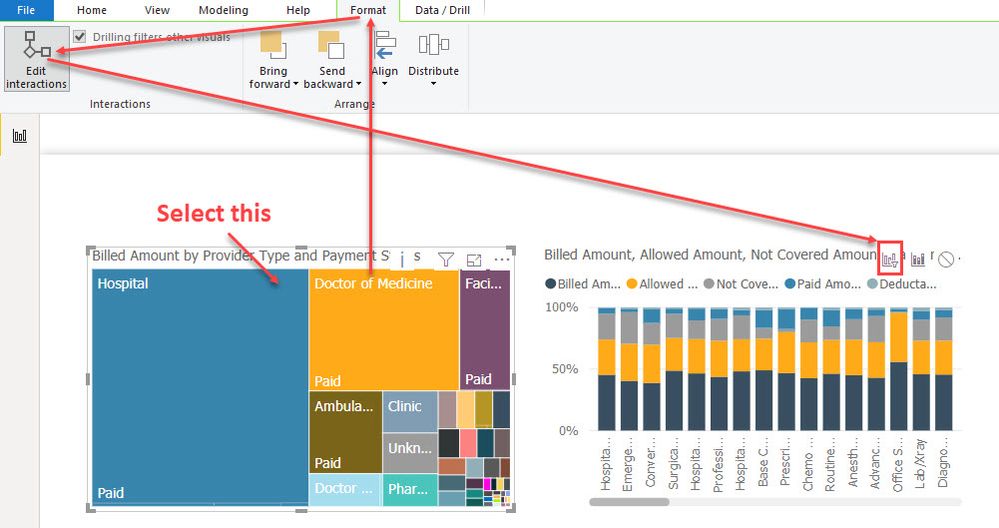
What you need to do is change the interaction between the items from hightlight to filter.
Select your filtering object then go to
Visual Tools > Format and turn on Edit Interactions
In your chart from the screen shot change the interaction in the top right corner.
Hello @Anonymous
What you need to do is change the interaction between the items from hightlight to filter.
Select your filtering object then go to
Visual Tools > Format and turn on Edit Interactions
In your chart from the screen shot change the interaction in the top right corner.
The Power BI Data Visualization World Championships is back! Get ahead of the game and start preparing now!
| User | Count |
|---|---|
| 39 | |
| 37 | |
| 33 | |
| 32 | |
| 29 |
| User | Count |
|---|---|
| 133 | |
| 88 | |
| 85 | |
| 68 | |
| 64 |