We've captured the moments from FabCon & SQLCon that everyone is talking about, and we are bringing them to the community, live and on-demand. Starts on April 14th. Register now
Hi, from the image below, I have a dimension table (Group Map table) acting as a Fact table to connect two other dimension tables. My problem is this:
I need to write DAX that says SUMX(Deliveries All, Deliveries All [Delivered] - Supplier, Supplier [Forecast])
Using the Related function, how am I able to achieve this to bring this answer into a Matrix table?
The reason I am asking this, is the ABS function does not provide an ABS column total (a Power BI bug). So I need to write a table formula to calculate this. Thanks.
Solved! Go to Solution.
Hi Gao, Many thanks for your time and reply but I found the solution today.
Our Supplier Forecast table misaligned to our internal Delivery table. I was able to match them using the query editor by:
1) Within the Delivery table, use the Group function to group the table by Date, Shop and Product ID, SUM-ing the Delivered totals.
2) I then duplictaed these columns and merged them into a Unique ID column called Delivery ID
3) I then duplicated and merged the same three columns in the Forcast table to the same Unique ID so the two tables could join.
4) Using a left outer join, I then merged the Forecast Table into the Delivery table only keeping the product decription and forecast values from the Forecast table. The newly created unique ID columns joined the data perfectly.
5) this will now allow me to write SUM and SUMX measures to create ABS values and totals.
So far, everything's talking to each other nicely. Using display cards in the reports, I can now display proper ABS Totals for the Delivery and Forecast differences, something the Matrix table wasn't computing.
The Matrix table was taking the Variance total and simply converting it to an ABS value, not SUMX-ing the product values as an ABS and SUMing those.
That exercise was a head-bender. Now I know how to join tables from two different companies to compare numbers related to each other.
Much appreciate your effort Gao. Cheers.
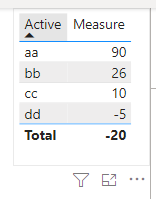
Hi @1001 ,
Not sure, please try:
Column =
VAR _VALUE = 'Deliveries_All'[Active]
VAR _RESULT =
CALCULATE (
SUM ( Deliveries_All[Delivered] ),
FILTER(ALL('Deliveries_All'),
'Deliveries_All'[Active] = _VALUE
)
)
-
CALCULATE (
SUM ( Supplier[Forecast] ),
FILTER(ALL('Supplier'),
'Supplier'[Active] = _VALUE
)
)
RETURN
_RESULT
or:
Measure =
VAR _VALUE = MAX('Deliveries_All'[Active])
VAR _RESULT =
SUMX (
VALUES ( Deliveries_All[Active] ),
CALCULATE (
SUM ( Deliveries_All[Delivered] ),
'Deliveries_All'[Active] = _VALUE
)
-
CALCULATE (
SUM ( Supplier[Forecast] ),
'Supplier'[Active] = _VALUE
)
)
RETURN
_RESULT
If I have misunderstood your needs, please feel free to contact me.
Best Regards,
Gao
Community Support Team
If there is any post helps, then please consider Accept it as the solution to help the other members find it more quickly. If I misunderstand your needs or you still have problems on it, please feel free to let us know. Thanks a lot!
How to get your questions answered quickly -- How to provide sample data
Hi Gao, Many thanks for your time and reply but I found the solution today.
Our Supplier Forecast table misaligned to our internal Delivery table. I was able to match them using the query editor by:
1) Within the Delivery table, use the Group function to group the table by Date, Shop and Product ID, SUM-ing the Delivered totals.
2) I then duplictaed these columns and merged them into a Unique ID column called Delivery ID
3) I then duplicated and merged the same three columns in the Forcast table to the same Unique ID so the two tables could join.
4) Using a left outer join, I then merged the Forecast Table into the Delivery table only keeping the product decription and forecast values from the Forecast table. The newly created unique ID columns joined the data perfectly.
5) this will now allow me to write SUM and SUMX measures to create ABS values and totals.
So far, everything's talking to each other nicely. Using display cards in the reports, I can now display proper ABS Totals for the Delivery and Forecast differences, something the Matrix table wasn't computing.
The Matrix table was taking the Variance total and simply converting it to an ABS value, not SUMX-ing the product values as an ABS and SUMing those.
That exercise was a head-bender. Now I know how to join tables from two different companies to compare numbers related to each other.
Much appreciate your effort Gao. Cheers.
If you have recently started exploring Fabric, we'd love to hear how it's going. Your feedback can help with product improvements.
A new Power BI DataViz World Championship is coming this June! Don't miss out on submitting your entry.
| User | Count |
|---|---|
| 57 | |
| 40 | |
| 36 | |
| 18 | |
| 18 |
| User | Count |
|---|---|
| 69 | |
| 64 | |
| 38 | |
| 34 | |
| 23 |