Join us at FabCon Atlanta from March 16 - 20, 2026, for the ultimate Fabric, Power BI, AI and SQL community-led event. Save $200 with code FABCOMM.
Register now!The Power BI Data Visualization World Championships is back! Get ahead of the game and start preparing now! Learn more
Hi all,
I hope you are all well,
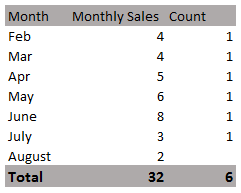
I'm trying to use the Countrows function that will show the count per month like below:
My challenge is that I'm struggling to exclude the current/max month (in this example, August) from the count. I do have a Month Offset column in the Dates table to try and reference the offset months.
The count should NOT include the current/max month (in this example, August).
Any ideas on what clause or varaible to add on? 🙂 Thank you
Kind Regards,
Asa
Solved! Go to Solution.
Assuming you have a month number in your date table, try
exclude max month =
VAR MaxMonth = CALCULATE(MAX(Date table [month number]), ALLSELECTED(Date Table))
RETURN
IF(MAX(Date table [month number]) = MaxMonth, BLANK(), [your COUNTROW measure])
Proud to be a Super User!
Paul on Linkedin.
Assuming you have a month number in your date table, try
exclude max month =
VAR MaxMonth = CALCULATE(MAX(Date table [month number]), ALLSELECTED(Date Table))
RETURN
IF(MAX(Date table [month number]) = MaxMonth, BLANK(), [your COUNTROW measure])
Proud to be a Super User!
Paul on Linkedin.
Hi Paul,
Thank you for the reply and yes, I do have a month number in my date table
If the measure is a calculated column, will this solution work?
The Power BI Data Visualization World Championships is back! Get ahead of the game and start preparing now!
| User | Count |
|---|---|
| 161 | |
| 132 | |
| 117 | |
| 79 | |
| 53 |