Join us at FabCon Atlanta from March 16 - 20, 2026, for the ultimate Fabric, Power BI, AI and SQL community-led event. Save $200 with code FABCOMM.
Register now!Vote for your favorite vizzies from the Power BI Dataviz World Championship submissions. Vote now!
Hi all,
I hope you are all well,
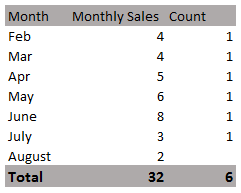
I'm trying to use the Countrows function that will show the count per month like below:
My challenge is that I'm struggling to exclude the current/max month (in this example, August) from the count. I do have a Month Offset column in the Dates table to try and reference the offset months.
The count should NOT include the current/max month (in this example, August).
Any ideas on what clause or varaible to add on? 🙂 Thank you
Kind Regards,
Asa
Solved! Go to Solution.
Assuming you have a month number in your date table, try
exclude max month =
VAR MaxMonth = CALCULATE(MAX(Date table [month number]), ALLSELECTED(Date Table))
RETURN
IF(MAX(Date table [month number]) = MaxMonth, BLANK(), [your COUNTROW measure])
Proud to be a Super User!
Paul on Linkedin.
Assuming you have a month number in your date table, try
exclude max month =
VAR MaxMonth = CALCULATE(MAX(Date table [month number]), ALLSELECTED(Date Table))
RETURN
IF(MAX(Date table [month number]) = MaxMonth, BLANK(), [your COUNTROW measure])
Proud to be a Super User!
Paul on Linkedin.
Hi Paul,
Thank you for the reply and yes, I do have a month number in my date table
If the measure is a calculated column, will this solution work?
Vote for your favorite vizzies from the Power BI World Championship submissions!
If you love stickers, then you will definitely want to check out our Community Sticker Challenge!
Check out the January 2026 Power BI update to learn about new features.
| User | Count |
|---|---|
| 63 | |
| 51 | |
| 41 | |
| 20 | |
| 16 |
| User | Count |
|---|---|
| 122 | |
| 106 | |
| 47 | |
| 30 | |
| 24 |