
cancel
Showing results for 
Search instead for 
Did you mean: 

Data Days is here! Join us now for 60+ days of learning, challenges, and connection. Learn more

Reply
orihait
Helper I
Helper I

Using sumif equivalent in a matrix visualization

hi guys,

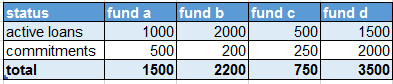
i've got a matrix visualization that calculates the sum of standing loans and approved loans by "fund".

it looks something like this and uses a very simple sum measure.


example.PNG


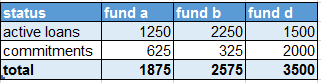
fund c is acutally a co investment by fund a and fund b so i'd like to refine the measure so that the output would ignore fund c and add 50% of it's balance to fund a and fund b.

the result should look like this : 


example 2.PNG

can anyone think of a method to achieve this output?

thanks!!!!.


4 REPLIES 4
ZunzunUOC
Resolver III
Resolver III

Hi @orihait , I would create the next calculated columns:


fund ab = 
var VarValue=Table1[status]
return
(LOOKUPVALUE(Table1[fund c];Table1[status];VarValue)/2)+Table1[fund a]
fund bb = 
var VarValue=Table1[status]
return
(LOOKUPVALUE(Table1[fund c];Table1[status];VarValue)/2)+Table1[fund b]

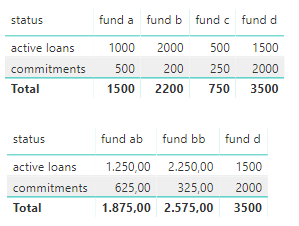
You would get your data:


reply011.png


Best Regards,
Miguel

If this post helps, then please consider Accept it as the solution to help the other members find it more quickly.


hi and thanks again for taking the time to help.


is there any way i could do it without creating new collumns i.e by using the matrix's filter context?

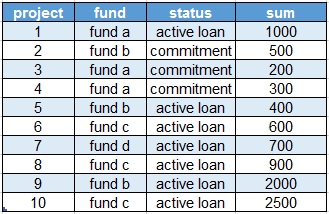
the raw data looks something like this


example.PNG

and should look like this on the matrix :

example 2.PNG

i figured i could use the visualization filter to edit fund c out and show only the ones i want.


thanks again! i highly appreciate it!


As far I know, you can create the matrix but not calculated like you need (fund a=fund a+ fund c/2 and fund b=fund b + fund c/2.


You would need calculate to achieve this.

Hi @orihait ,


Don't know if this answer is still on time but try the following:

  • Create a table with the participation percentages:

Fund Parent Percentage

C A 50%
C B 50%
A A 100%
B B 100%
D D 100%


  • Add the following measure:


Measure = 
SUMX (
    ADDCOLUMNS (
        SUMMARIZE ( Participation; Participation[Parent] );
        "@Total"; CALCULATE (
            SUM ( Projects[Total] );
            FILTER ( Projects; Projects[Fund] = Participation[Parent] )
        )
    );
    [@Total]
)
    + SUMX (
        ADDCOLUMNS (
            SUMMARIZE ( Participation; Participation[Fund]; Participation[Percentage] );
            "@Total"; CALCULATE (
                SUM ( Projects[Total] ) * SELECTEDVALUE ( Participation[Percentage] );
                FILTER (
                    Projects;
                    Projects[Fund] = Participation[Fund]
                        && Participation[Percentage] <> 1
                )
            )
        );
        [@Total]
    )


Now create your matrix with the Parent column on the previous created table as columns, status on rows and the measure on values.


should give expected result.


Regards

Miguel Félix


Did I answer your question? Mark my post as a solution!

Proud to be a Super User!

Check out my blog: Power BI em Português


Helpful resources

Announcements
Fabric Data Days is here Carousel

Fabric Data Days 2026

Don't miss out on Data Days, June 15 through August 7. Learn Fabric, Power BI, SQL, AI and more.

May Power BI Update Carousel

Power BI Monthly Update - May 2026

Check out the May 2026 Power BI update to learn about new features.

Power BI DataViz World Championships carousel

Power BI DataViz World Championships - June 2026

A new Power BI DataViz World Championship is coming this June! Don't miss out on submitting your entry.