cancel
Showing results for 
Search instead for 
Did you mean: 

Learn from the best! Meet the four finalists headed to the FINALS of the Power BI Dataviz World Championships! Register now

Reply
Anonymous
Not applicable

Using shape card and using a world map

Hi,


I´m currently working on a shape card. However, I am facing the following problem:


I would like to use a custom map of the whole world. When I'm loading the TopoSJON link in to Power BI, there is only a grey square with a lot of lines. The link is from the following website:


https://ec.europa.eu/eurostat/web/gisco/geodata/reference-data/administrative-units-statistical-unit...


The steps I do:

1. Click on Link

2. Select the ZIP file of TopoSjon with scale 1:1 million

3. Open the link and download document CNTR_BN_01M_2020_3035.JSON

4. Add it to Power BI ->Shape -> Add assignment


Who can help me map the world with the right TopoSJON data?


Thanks in Advance


1 ACCEPTED SOLUTION
Anonymous
Not applicable

Hi @Anonymous ,


1.To enable Shape Map, select File > Options and Settings > Options > Preview Features, then select the Shape Map Visual checkbox. You'll need to restart Power BI Desktop after you make the selection.
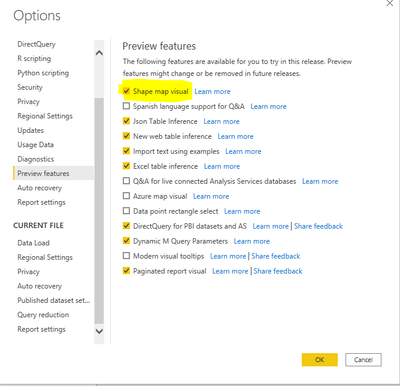
Eyelyn9_0-1630647653714.png

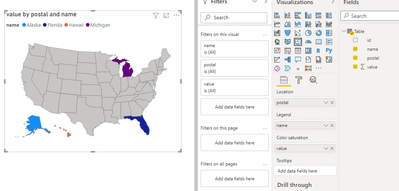
2.Then I enter some simply data to create a Shape Map visual:

id name postal value
us-mi Michigan MI 1
us-ak Alaska AK 2
us-hi Hawaii HI 3
us-fi Florida FL 4

Eyelyn9_2-1630649281173.png

Then, in the Visualizations pane with the Format section selected, expand the Shape section and select + Add Map to import the TopoJSON file:
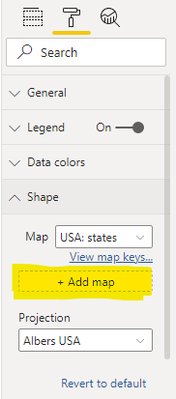
Eyelyn9_3-1630649393548.png


Refer to:

Use Shape maps in Power BI Desktop (Preview) - Power BI | Microsoft Docs

https://community.powerbi.com/t5/Power-Query/Importing-TopoJSON-file-to-create-shape-map-what-Next/td-p/857202


Best Regards,
Eyelyn Qin
If this post helps, then please consider Accept it as the solution to help the other members find it more quickly.

View solution in original post

1 REPLY 1
Anonymous
Not applicable

Hi @Anonymous ,


1.To enable Shape Map, select File > Options and Settings > Options > Preview Features, then select the Shape Map Visual checkbox. You'll need to restart Power BI Desktop after you make the selection.

Eyelyn9_0-1630647653714.png

2.Then I enter some simply data to create a Shape Map visual:

id name postal value
us-mi Michigan MI 1
us-ak Alaska AK 2
us-hi Hawaii HI 3
us-fi Florida FL 4

Eyelyn9_2-1630649281173.png

Then, in the Visualizations pane with the Format section selected, expand the Shape section and select + Add Map to import the TopoJSON file:

Eyelyn9_3-1630649393548.png


Refer to:

Use Shape maps in Power BI Desktop (Preview) - Power BI | Microsoft Docs

https://community.powerbi.com/t5/Power-Query/Importing-TopoJSON-file-to-create-shape-map-what-Next/td-p/857202


Best Regards,
Eyelyn Qin
If this post helps, then please consider Accept it as the solution to help the other members find it more quickly.

Helpful resources

Announcements
Join our Fabric User Panel

Join our Fabric User Panel

Share feedback directly with Fabric product managers, participate in targeted research studies and influence the Fabric roadmap.

March Power BI Update Carousel

Power BI Community Update - March 2026

Check out the March 2026 Power BI update to learn about new features.