This time we’re going bigger than ever. Fabric, Power BI, SQL, AI and more. We're covering it all. You won't want to miss it.
Learn moreDid you hear? There's a new SQL AI Developer certification (DP-800). Start preparing now and be one of the first to get certified. Register now
Hi @community,
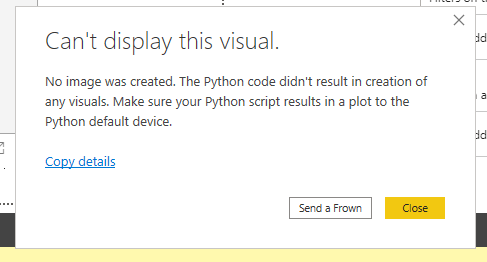
I have an issue with using python plotly package for a custom vizualization. When I run the working python script in Power BI (tested and working in Visual Studio) it shows an error and the following message appears:
at the same time the vizualization opens a new tab in my default browser. Is it possible to somehow avoid that opening and have the vizualization opened in Power BI.
Many thanks in advance.
Cheers,
Saro
Solved! Go to Solution.
Hi @Anonymous
I'm afraid that Plotly is not supported in Power BI currenly. Based on the document, the following table shows which packages are supported in the Power BI service.
| Package | Version | Link |
|---|---|---|
| matplotlib | 3.2.1 | https://pypi.org/project/matplotlib |
| numpy | 1.18.4 | https://pypi.org/project/numpy |
| pandas | 1.0.1 | https://pypi.org/project/pandas |
| scikit-learn | 0.23.0 | https://pypi.org/project/scikit-learn |
| scipy | 1.4.1 | https://pypi.org/project/scipy |
| s eaborn | 0.10.1 | https://pypi.org/project/seaborn |
| statsmodels | 0.11.1 | https://pypi.org/project/statsmodels |
| xgboost | 1.1.0 | https://pypi.org/project/xgboost |
In addition, you could refer to this similar thread which should make sense. And you also could vote up the idea: https://ideas.powerbi.com/forums/265200-power-bi-ideas/suggestions/38260432-plotly-package-support-with-python .
Hi @Anonymous
I'm afraid that Plotly is not supported in Power BI currenly. Based on the document, the following table shows which packages are supported in the Power BI service.
| Package | Version | Link |
|---|---|---|
| matplotlib | 3.2.1 | https://pypi.org/project/matplotlib |
| numpy | 1.18.4 | https://pypi.org/project/numpy |
| pandas | 1.0.1 | https://pypi.org/project/pandas |
| scikit-learn | 0.23.0 | https://pypi.org/project/scikit-learn |
| scipy | 1.4.1 | https://pypi.org/project/scipy |
| s eaborn | 0.10.1 | https://pypi.org/project/seaborn |
| statsmodels | 0.11.1 | https://pypi.org/project/statsmodels |
| xgboost | 1.1.0 | https://pypi.org/project/xgboost |
In addition, you could refer to this similar thread which should make sense. And you also could vote up the idea: https://ideas.powerbi.com/forums/265200-power-bi-ideas/suggestions/38260432-plotly-package-support-with-python .
Check out the April 2026 Power BI update to learn about new features.
If you have recently started exploring Fabric, we'd love to hear how it's going. Your feedback can help with product improvements.
| User | Count |
|---|---|
| 36 | |
| 32 | |
| 31 | |
| 21 | |
| 15 |
| User | Count |
|---|---|
| 66 | |
| 56 | |
| 31 | |
| 27 | |
| 22 |