cancel
Showing results for 
Search instead for 
Did you mean: 

July 7 - July 17 | Round 2 of the Power BI Dataviz World Championships. Don't miss your chance! Learn more

Reply
Anonymous
Not applicable

Using parameter table to make new column

Hi,


I have a table Booking imported from an Excel file


IDCodeMemberschipInstallmentCommission
1B86,9460,00250,00
2C19,44255,00750,00
3B7,86705,002000,00
4C33,0075,00240,00
5C60,04120,00390,00
6C78,44420,001300,00
7A7,46615,001700,00
8A67,16105,00350,00
9C38,1030,00120,00
10C97,44120,00420,00
11C65,04180,00550,00
12A2,95105,00286,00
13C65,59255,00760,00


I want to add a new column Report_Commission using a table Commission_Parameters I created by using "Enter data": 


CodeTax%Commision%
A0,09250,25


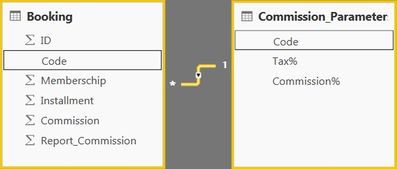
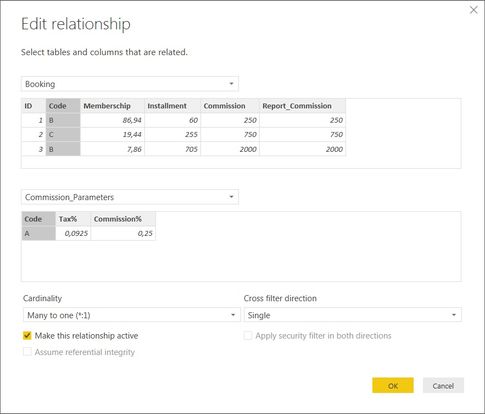
 The two tables are linked:


Booking1.jpg


Booking2.jpg


To add the new column, I use "New Column" in the Home tab


Report_Commission = IF(Booking[Code]="A";Booking[Memberschip]+Booking[Installment]*0,25/0,0925;Booking[Commission])


Question 1: Why can't I find the table Commission_Parameters in the autocompletion?


Question 2:

When I explicitly add the two fields from Commission_Parameters:


Report_Commission = IF(Booking[Code]="A"; Booking[Memberschip] + Booking[Installment] * Commission_Parameters[Commission%] / Commission_Parameters[Tax%]; Booking[Commission])


why do I get the error:  "A single value for column 'Commission%' in table 'Commission_Parameters' cannot be determined. This can happen when a measure formula refers to a column that contains many values without specifying an aggregation such as min, max, count, or sum to get a single result."?


Question 3: Why does this error persist even when I add an aggregation to the fields Commission_Parameters[Commission%] and Commission_Parameters[Tax%]?


Thanks,


R.W.


1 ACCEPTED SOLUTION
HotChilli
Community Champion
Community Champion

The answers to almost all of your questions are to do with how you link to the other table from the 'many' side.

You have to use the RELATED function.  The intellisense (autocompletion) is smart enough to give you only items that it thinks you can use according to the template of the functions you call.

View solution in original post

3 REPLIES 3
DaFloDo
Resolver I
Resolver I

hi,


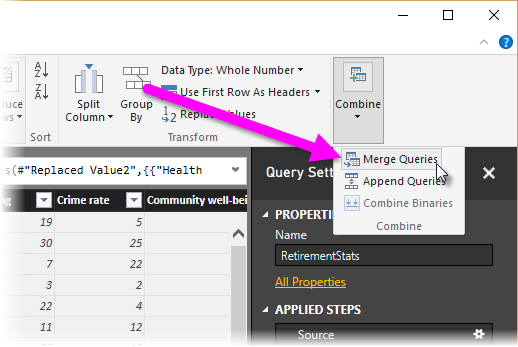
you could also join the information as additional columns using power query - I like to do this for these cases

https://docs.microsoft.com/en-us/power-bi/desktop-shape-and-combine-data


shapecombine_mergequeries.pngshapecombine_mergeexpand.png 


best regards,


florian

HotChilli
Community Champion
Community Champion

The answers to almost all of your questions are to do with how you link to the other table from the 'many' side.

You have to use the RELATED function.  The intellisense (autocompletion) is smart enough to give you only items that it thinks you can use according to the template of the functions you call.

Anonymous
Not applicable

Hi HotChilli,


Thanks, this works


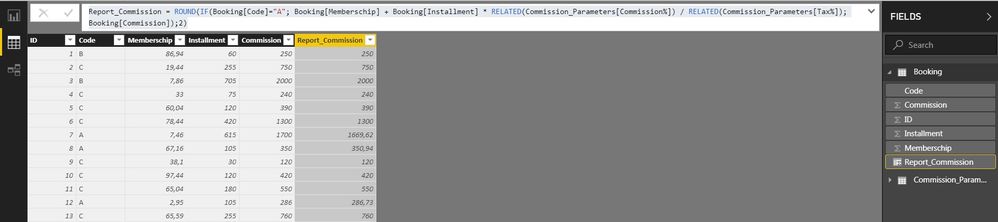
Report_Commission = ROUND(IF(Booking[Code]="A"; Booking[Memberschip] + Booking[Installment] * RELATED(Commission_Parameters[Commission%]) / RELATED(Commission_Parameters[Tax%]); Booking[Commission]);2)


Booking3.jpg


R.W.

Helpful resources

Announcements
FabCon and SQLCon Barcelona 2026

FabCon & SQLCon – Barcelona 2026

Join us in Barcelona for FabCon and SQLCon, the Fabric, Power BI, SQL, and AI community event. Save €200 with code FABCMTY200.

60 days of Data Days Carousel

Data Days 2026

Join Fabric Data Days 2026: 60 days of free live/on-demand sessions, challenges, study groups, and certification opportunities.

Power BI DataViz World Championships carousel

Power BI DataViz World Championships - June 2026

A new Power BI DataViz World Championship is coming this June! Don't miss out on submitting your entry.