cancel
Showing results for 
Search instead for 
Did you mean: 

We've captured the moments from FabCon & SQLCon that everyone is talking about, and we are bringing them to the community, live and on-demand. Starts on April 14th. Register now

Reply
Anonymous
Not applicable

Using group by function in dax

Hi,


I have the below table In which Final Value is my output column

It is supposed to be calculated such that if

Case 1: For Each Anchor Config and Target Config Combination, If Compare value has at least 1 Yes value then all rows become Yes.

Case 2:  For Each Anchor Config and Target Config Combination, If Compare value has no Single Yes value then all rows become No

Anchor ConfigTarget ConfigCompare ValueFinal Value
101102NoYes
101102NoYes
101102YesYes
101102YesYes
110120NoNo
110120NoNo
110120NoNo
110120NoNo
1 ACCEPTED SOLUTION
v-lionel-msft
Community Support
Community Support

Hi @Anonymous ,

Here’s my DAX, which is a column:

F_value = 
VAR x =
FILTER(
    Sheet4,
    [Anchor Config] = EARLIER([Anchor Config]) &&  [Target Config] = EARLIER([Target Config])
)
VAR y =
CONTAINS(
    x,
    [Compare Value],
    "Yes"
)
RETURN
IF(
    y = TRUE(),
    "Yes",
    "NO")

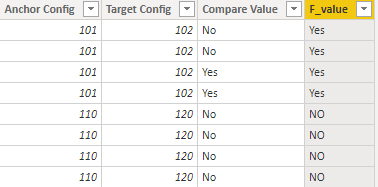
And here’s my test result:

a8.PNG


Best regards,
Lionel Chen


If this post helps, then please consider Accept it as the solution to help the other members find it more quickly.

View solution in original post

3 REPLIES 3
v-lionel-msft
Community Support
Community Support

Hi @Anonymous ,

Here’s my DAX, which is a column:

F_value = 
VAR x =
FILTER(
    Sheet4,
    [Anchor Config] = EARLIER([Anchor Config]) &&  [Target Config] = EARLIER([Target Config])
)
VAR y =
CONTAINS(
    x,
    [Compare Value],
    "Yes"
)
RETURN
IF(
    y = TRUE(),
    "Yes",
    "NO")

And here’s my test result:

a8.PNG


Best regards,
Lionel Chen


If this post helps, then please consider Accept it as the solution to help the other members find it more quickly.

Anonymous
Not applicable

Hi Lionel,


It works. Thanks. But can you also explain the DAX to me? I'm not a regular user of advanced DAX functions.

Hi @Anonymous ,

First, return a table by grouping two columns: [Anchor Config] & [Target Config], the function I used is "EARLIER()":

EARLIER() 

Second, determine if there is a 'yes' in the table (the table is the first step's return ), the function I used is "CONTAINS()":

CONTAINS() 

At last, use IF function to return the column.

If you understand the 'Context' in DAX, it will be easy.

Row context & filter context 

Best regards,

Lionel Chen

If this post helps, then please consider Accept it as the solution to help the other members find it more quickly


Helpful resources

Announcements
New to Fabric survey Carousel

New to Fabric Survey

If you have recently started exploring Fabric, we'd love to hear how it's going. Your feedback can help with product improvements.

Power BI DataViz World Championships carousel

Power BI DataViz World Championships - June 2026

A new Power BI DataViz World Championship is coming this June! Don't miss out on submitting your entry.

Join our Fabric User Panel

Join our Fabric User Panel

Share feedback directly with Fabric product managers, participate in targeted research studies and influence the Fabric roadmap.

March Power BI Update Carousel

Power BI Community Update - March 2026

Check out the March 2026 Power BI update to learn about new features.