Join us at FabCon Atlanta from March 16 - 20, 2026, for the ultimate Fabric, Power BI, AI and SQL community-led event. Save $200 with code FABCOMM.
Register now!Vote for your favorite vizzies from the Power BI Dataviz World Championship submissions. Vote now!
Hello everyone,
here is a issue i'm facing:
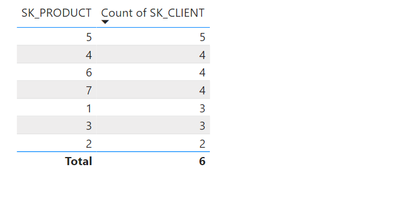
i have two tables (Products and Sales) and i need to have a measure to show me how many products i have that more than 3 different Clients bought(in this case only the top 4 lines will be true)
i already tried something like this
Solved! Go to Solution.
Perfect James!!
Thanks a lot
Hello JamesFr06, thanks for your reply.
I can't do that way, what i need is the number of rows of this solution you shared above, in the DAX example i used i tried to create this example as a variable and use the COUNTROWS() on it, but it doesn't work
llo
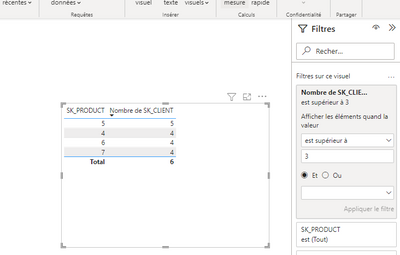
Why dont you use the filter ?
Vote for your favorite vizzies from the Power BI World Championship submissions!
If you love stickers, then you will definitely want to check out our Community Sticker Challenge!
Check out the January 2026 Power BI update to learn about new features.
| User | Count |
|---|---|
| 60 | |
| 54 | |
| 43 | |
| 20 | |
| 17 |
| User | Count |
|---|---|
| 123 | |
| 108 | |
| 44 | |
| 32 | |
| 24 |