cancel
Showing results for 
Search instead for 
Did you mean: 

Get Fabric certified for FREE! Don't miss your chance! Learn more

Reply
itchyeyeballs
Impactful Individual

Using dimension as header breaks all filter

Hi all,


We have hit a problem with our data analysis, we have been using a measure to calculate the value for a previous period, it was woking fine until we introduced a dimension table and used it as the column heading rather than the value from the fact table.


Measure is 

=VAR yearx =
    MAX ( 'Fact_Table'[Year_Cyear_Index] )
RETURN
    CALCULATE (
        [FTE_Sum_End],
        FILTER (
            ALL (Fact_Table'[Year_Cyear_Index], 'Fact_Table'[ayr],'MIT enrol_load_procedure_tbl'[cyear]),
            'Fact_Table'[Year_Cyear_Index]
                = yearx - 101
        )
          )

If we use Fact_Table'[cyear] as the column header the measure works, if we use dimension_table[cyear] it stops, I have no idea how to resolve so any suggestions appreciated, we have had to introdue the dimension table as we now have a second fact table that we need to introduce.

5 REPLIES 5
MFelix
Super User
Super User

Hi @itchyeyeballs,


Withouth having a sample of your data is difficult to pin point the error however you can check:


  • Is there a relationship between the Fact_Table and the Dimension_Table?
  • Are you using the Dimension_Table column as a context in your visual or still using the Fact Table column?


If you can supply a sample of the data would be easier to help you.


Regards,

MFelix


Regards

Miguel Félix


Did I answer your question? Mark my post as a solution!

Proud to be a Super User!

Check out my blog: Power BI em Português


HI,


Thanks for the speedy response.


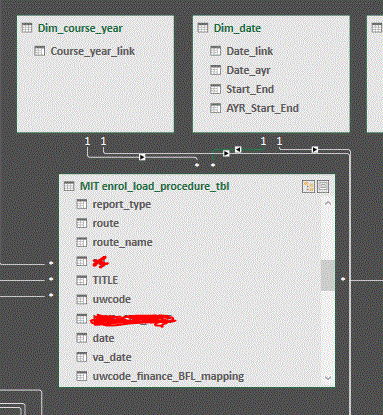
In my model I have 2 fact tables and several dimension tables (all linked correctly)


In my visual (a pivot grid) I have been using the fact table columns as the table headers, I switched to using the dimension table columns in order to introduce a second fact table and things stopped working.


My data looks like (I have simplified the fact tabe - it has more columns but only showing relevant ones)


Fact table:

Cyear

VaDate

FTE

cyear_index


Dimension1 

Cyear


Dimension2

Date_link

Date_ayr


Capture.GIF

Hi @itchyeyeballs,


Can you please give me examples of the data for instance you have cyear is this 2018, 2017 or any other number?


Just so I can make a mockup file easier.


Thank you.


MFelix


Regards

Miguel Félix


Did I answer your question? Mark my post as a solution!

Proud to be a Super User!

Check out my blog: Power BI em Português


Hi, 


Many thanks for your time, much appreciated.


My basic challenge is to calculate progression rate, course year 1 16/17 to course year 2 17/18. I have created an integer index field which was allowing me to work out the right figure, however moveing to using 2 dimension tables has caused me issues with the filtering.


I need to override the two dimension tables in order to work out previous year value so I can then find the proression rate


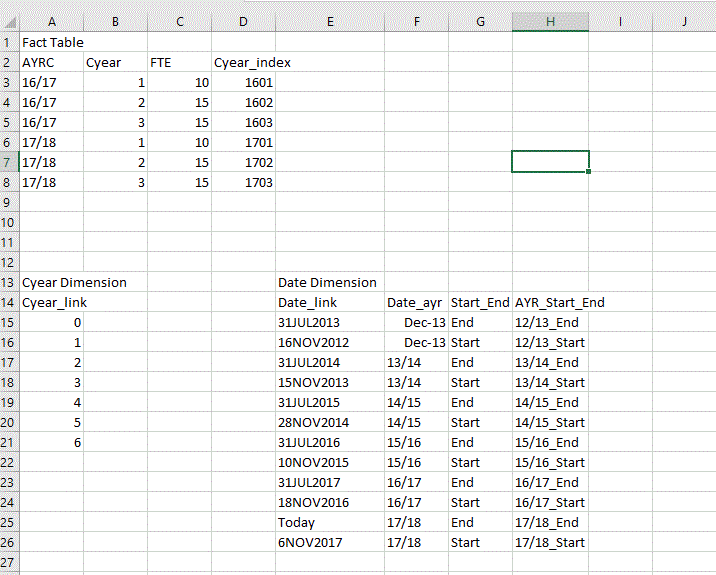
Sample data:

Capture.GIF


Sample output:


Capture.GIF

I can possibly work around this by combining the two dimension tables into one but I'd love to know how to use the all() function in cases where multiple dimension tbles are used.

itchyeyeballs
Impactful Individual

I think I answered my own query by using an extra all:

 FILTER (
            ALL ('MIT enrol_load_procedure_tbl'[Year_Cyear_Index], 'MIT enrol_load_procedure_tbl'[ayr],'MIT enrol_load_procedure_tbl'[cyear],'MIT enrol_load_procedure_tbl'[va_date]),
            'MIT enrol_load_procedure_tbl'[Year_Cyear_Index]= yearx - 101
        ),
        all(Dim_course_year[Course_year_link])
          )

However this stops working if I try to add an extra all() for a second dimension table

=VAR yearx =
    MAX ( 'MIT enrol_load_procedure_tbl'[Year_Cyear_Index] )
RETURN
    CALCULATE (
        [FTE_Sum_End],
        FILTER (
            ALL ('MIT enrol_load_procedure_tbl'[Year_Cyear_Index], 'MIT enrol_load_procedure_tbl'[ayr],'MIT enrol_load_procedure_tbl'[cyear],'MIT enrol_load_procedure_tbl'[va_date]),
            'MIT enrol_load_procedure_tbl'[Year_Cyear_Index]= yearx - 101
        ),
        all(Dim_course_year[Course_year_link])
        ,all(Dim_date,Dim_date[Date_ayr])
          )

gives - Multiple table arguments are not allowed in the ALL function.

Helpful resources

Announcements
Sticker Challenge 2026 Carousel

Join our Community Sticker Challenge 2026

If you love stickers, then you will definitely want to check out our Community Sticker Challenge!

January Power BI Update Carousel

Power BI Monthly Update - January 2026

Check out the January 2026 Power BI update to learn about new features.

FabCon Atlanta 2026 carousel

FabCon Atlanta 2026

Join us at FabCon Atlanta, March 16-20, for the ultimate Fabric, Power BI, AI and SQL community-led event. Save $200 with code FABCOMM.