
Join us at FabCon Atlanta from March 16 - 20, 2026, for the ultimate Fabric, Power BI, AI and SQL community-led event. Save $200 with code FABCOMM.
Register now!Vote for your favorite vizzies from the Power BI Dataviz World Championship submissions. Vote now!
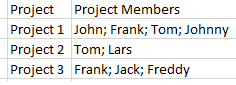
I'm trying to create a as timeline visualisation, showing timelines by project and project members. Basically I want to show what projects project member x is involved with and who is involved in project x. Input is SharePoint list with multiple values, displayed in Power query like this:
I split the "project Members" by semi colon in (here) 5, apply some trim and clean and get:
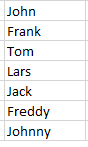
Then I create a slicer table for distinct project member values:
Resulting in
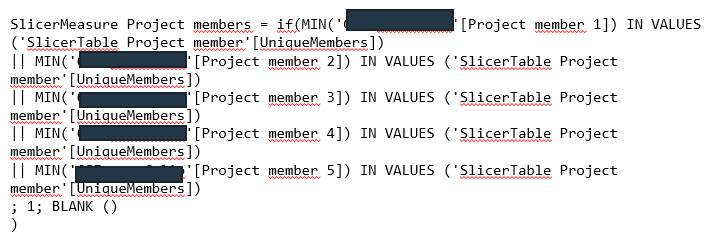
and a slicer measure comparing names in Project member 1-5 columns to values in slicer table:
The question is: What do I need to do next to be able to visualise projects and project members the way I want ("what projects project member x is involved with and who is involved in project x")?
Solved! Go to Solution.
Another alternative is to use a more formal data modeling approach and create a cross-reference file. We show how to do this in the blog post. It may give you some different ideas on how to approach the problem.
https://marqueeinsights.com/how-to-work-with-sharepoint-multi-value-columns-in-power-bi/
Hope this helps!
--Treb, Power BI MVP
Another alternative is to use a more formal data modeling approach and create a cross-reference file. We show how to do this in the blog post. It may give you some different ideas on how to approach the problem.
https://marqueeinsights.com/how-to-work-with-sharepoint-multi-value-columns-in-power-bi/
Hope this helps!
--Treb, Power BI MVP
hi @mrhooki
For "what projects project member x is involved with",
You could create a new measure as below:
Project for each member = var _table=CALCULATETABLE(VALUES('Table'[Project]),FILTER('Table','Table'[Project Members.1]=SELECTEDVALUE('SlicerTable Project member'[Uniquemembers]) ||'Table'[Project Members.2]=SELECTEDVALUE('SlicerTable Project member'[Uniquemembers]) ||'Table'[Project Members.3]=SELECTEDVALUE('SlicerTable Project member'[Uniquemembers]) ||'Table'[Project Members.4]=SELECTEDVALUE('SlicerTable Project member'[Uniquemembers]))) return
CONCATENATEX(_table,[Project],";")
Then drag [Uniquemembers] field and this measure into a table visual.
For who is involved in project x
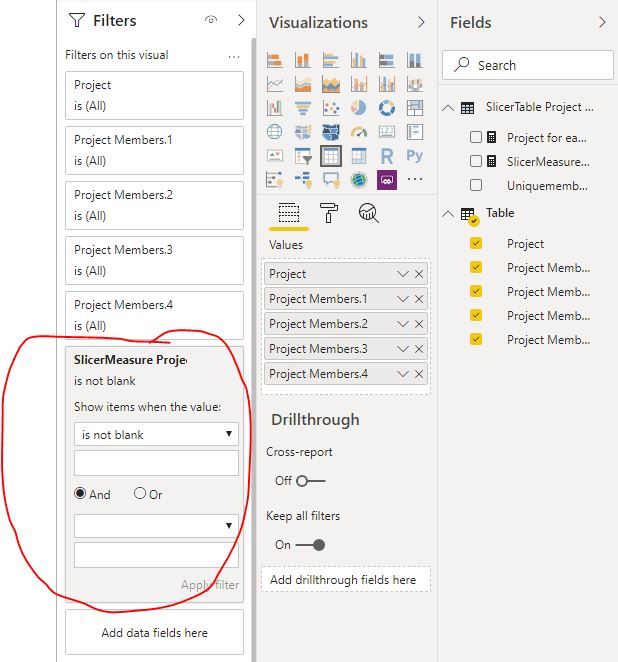
You just need to drag this measure[Project for each member] into a table visual and set filter is not blank
Here is a sample pbix file, please try it.
Regards,
Lin
@v-lili6-msftthanks for the effort, but I was not able to make the solution work (might very well be due to a mistake on my side) and discovered that creating a reference table solved the problem without programming/measures.
Vote for your favorite vizzies from the Power BI World Championship submissions!
If you love stickers, then you will definitely want to check out our Community Sticker Challenge!
Check out the January 2026 Power BI update to learn about new features.
| User | Count |
|---|---|
| 66 | |
| 51 | |
| 42 | |
| 25 | |
| 22 |
| User | Count |
|---|---|
| 139 | |
| 116 | |
| 54 | |
| 37 | |
| 31 |