cancel
Showing results for 
Search instead for 
Did you mean: 

July 7 - July 17 | Round 2 of the Power BI Dataviz World Championships. Don't miss your chance! Learn more

Reply
bolabuga
Helper V
Helper V

Using count with search text in column.

Hello everyone, 


I would like helping for counting a specific amount of services in a table. i will list the sample.


SERVICE   	CODE	OBS
2652016000002	102023	XXXXXXXXXXXXXXXXXXX Alt.TL: de A p/ B
2652016000003	102023	YYYYYYYYYYYYYYYY Alt.TL: de B p/ A
2652016000004	102023	ADFD FDFD FDF  Alt.TL: de A p/ D
2652016000005	102023	ADSF JKDFDSÇLKFSJKL Alt.TL: de E p/ B
2652016000006	102023	ASDFBALKDJKLSJK Alt.TL: de A p/ B
2652016000007	102023	ASKDJFLÇASDJFASDDJ Alt.TL: de A p/ B
2652016000008	102023	AKDFJKLASJFASDJK Alt.TL: de A p/ B
2652016000009	102023	FLAKSJDFLÇKASJFD Alt.TL: de D p/ B
2652016000010	102023	UUUUUUUUUUUUUUU Alt.TL: de C p/ B
2652016000011	102023	XXXXXXXXXXXXX Alt.TL: de A p/F
2652016000012	102023	ASAAADDDDDDDDDD Alt.TL: de A p/ B
2652016000013	102023	AAAAAAAAAADDDDDDD Alt.TL: de C p/ B
2652016000014	102023	AAAAAAAAAASSSS Alt.TL: de A p/ B
2652016000015	102023	AAAAAAAAADDDDDD Alt.TL: de C p/ B

I would like to Count [SERVICE] if [CODE]=102023 and [obs]="Alt.TL: de A p/ B". The problem for me is that on the "OBS" column can have different kind of texts before the portion that is important.


im Trying the following thats not working:

COUNTAX(
          FILTER(TABLE; 
TABLE[CODE]=102023
&&
ISNUMBER(FIND("Alt.TL: de A p/ B";TABLE[OBS]))
);
TABLE[SERVICE])
1 ACCEPTED SOLUTION
Greg_Deckler
Community Champion
Community Champion

You could do it like this:


Custom Column:

ContainsText = SEARCH("Alt.TL: de A p/ B",[OBS],1,0)

Measure:

MyCount = CALCULATE(COUNTROWS(Codes),FILTER(Codes,Codes[CODE]=102023 && Codes[ContainsText]<>0))


Follow on LinkedIn
@ me in replies or I'll lose your thread!!!
Instead of a Kudo, please vote for this idea
Become an expert!: Enterprise DNA
External Tools: MSHGQM
YouTube Channel!: Microsoft Hates Greg
Latest book!:
DAX For Humans

DAX is easy, CALCULATE makes DAX hard...

View solution in original post

5 REPLIES 5
Greg_Deckler
Community Champion
Community Champion

You could do it like this:


Custom Column:

ContainsText = SEARCH("Alt.TL: de A p/ B",[OBS],1,0)

Measure:

MyCount = CALCULATE(COUNTROWS(Codes),FILTER(Codes,Codes[CODE]=102023 && Codes[ContainsText]<>0))


Follow on LinkedIn
@ me in replies or I'll lose your thread!!!
Instead of a Kudo, please vote for this idea
Become an expert!: Enterprise DNA
External Tools: MSHGQM
YouTube Channel!: Microsoft Hates Greg
Latest book!:
DAX For Humans

DAX is easy, CALCULATE makes DAX hard...

Thks smoupre,


My main table had 1 blank space more than it should, after that everything worked fine.

Awesome! Glad you got it working!


Follow on LinkedIn
@ me in replies or I'll lose your thread!!!
Instead of a Kudo, please vote for this idea
Become an expert!: Enterprise DNA
External Tools: MSHGQM
YouTube Channel!: Microsoft Hates Greg
Latest book!:
DAX For Humans

DAX is easy, CALCULATE makes DAX hard...

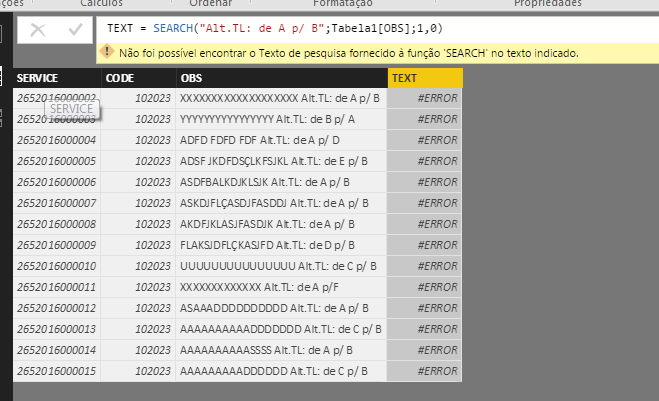
Hi smoupre, im getting this error:


"The search text provided to the 'SEARCH' function could not be found in the indicated text."


Strange, because i can see the text is there, i even searched for just "A p/ B" and its returning the same error.


Capturar.PNG

Its working on my example table, i forgot the semicolon on the calculated column. "TEXT = SEARCH("ALT.TL: DE A P/ B";Tabela1[OBS];1;0)"


But its strange, in my main table, the search function is not finding the text, and it is filling everything with zeros.....Any ideas??

Helpful resources

Announcements
FabCon and SQLCon Barcelona 2026

FabCon & SQLCon – Barcelona 2026

Join us in Barcelona for FabCon and SQLCon, the Fabric, Power BI, SQL, and AI community event. Save €200 with code FABCMTY200.

60 days of Data Days Carousel

Data Days 2026

Join Fabric Data Days 2026: 60 days of free live/on-demand sessions, challenges, study groups, and certification opportunities.

Power BI DataViz World Championships carousel

Power BI DataViz World Championships - June 2026

A new Power BI DataViz World Championship is coming this June! Don't miss out on submitting your entry.