cancel
Showing results for 
Search instead for 
Did you mean: 

Next up in the FabCon + SQLCon recap series: The roadmap for Microsoft SQL and Maximizing Developer experiences in Fabric. All sessions are available on-demand after the live show. Register now

Reply
Anonymous
Not applicable

Using constant Total from Linked table

Good morning,


I'm stuck in a seemingly easy problem, illustrated below:


I have two linked tables:


Table1.jpg


I'm trying to calculate the % of TV and Cinema in a bar chart with a slicer for choosing Country. If I use Count as % of GT in the second table only, it gives me a wrong number because it takes into account all rows, where Respondents are duplicated (as it is unpivoted).


I then tried the following formula: %Value=COUNTA('Tab2'[Value]) / CALCULATE(Sum('Tab1'[Count]),ALL('Tab1') but this returns the correct results for the total sample, but wrong results when I start slicing by Country (because the Sum of Count remains constant so it always divides by the total sample.


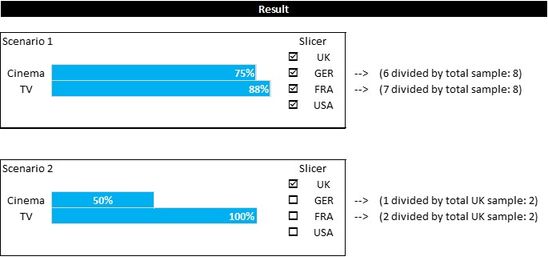
To illustrate, this is what I'm trying to achieve:


Table2.jpg

 I tried a lot of variations of the formula above, but never got it work for both Total sample and by country. What am I missing?


Any help much appreciated!


George

1 ACCEPTED SOLUTION
v-yulgu-msft
Microsoft Employee
Microsoft Employee

Hi @Anonymous,


Please modify your measure as below:

%Value =
COUNTA ( 'Tab2'[Value] )
    / CALCULATE ( SUM ( 'Tab1'[Count] ), ALLEXCEPT ( 'Tab1', Tab1[Country] ) )

Best regards,
Yuliana Gu

Community Support Team _ Yuliana Gu
If this post helps, then please consider Accept it as the solution to help the other members find it more quickly.

View solution in original post

2 REPLIES 2
v-yulgu-msft
Microsoft Employee
Microsoft Employee

Hi @Anonymous,


Please modify your measure as below:

%Value =
COUNTA ( 'Tab2'[Value] )
    / CALCULATE ( SUM ( 'Tab1'[Count] ), ALLEXCEPT ( 'Tab1', Tab1[Country] ) )

Best regards,
Yuliana Gu

Community Support Team _ Yuliana Gu
If this post helps, then please consider Accept it as the solution to help the other members find it more quickly.
Anonymous
Not applicable

Thank you very much Yuliana!


Your solution did the trick (+ getting rid of a two-way relationship between my tabs!)


George.

Helpful resources

Announcements
New to Fabric survey Carousel

New to Fabric Survey

If you have recently started exploring Fabric, we'd love to hear how it's going. Your feedback can help with product improvements.

Power BI DataViz World Championships carousel

Power BI DataViz World Championships - June 2026

A new Power BI DataViz World Championship is coming this June! Don't miss out on submitting your entry.

Join our Fabric User Panel

Join our Fabric User Panel

Share feedback directly with Fabric product managers, participate in targeted research studies and influence the Fabric roadmap.

March Power BI Update Carousel

Power BI Community Update - March 2026

Check out the March 2026 Power BI update to learn about new features.