
cancel
Showing results for 
Search instead for 
Did you mean: 

The Power BI Data Visualization World Championships is back! Get ahead of the game and start preparing now! Learn more

Reply
solankikumar
New Member

Using change log to create weekly fact data

Hi Experts , 

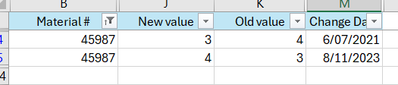
I have change log table with effective date for No. of packs in Box we sell (sample below) - 3 years data


solankikumar_0-1713402145471.png


- & i have data for No. of packs as of today (for all material) - like below 


solankikumar_1-1713402170017.png

what would be best calc to use above which can give me what was EA in Box for all week ending in last 3 years. 


Thanks 

1 REPLY 1
amitchandak
Super User
Super User

@solankikumar , Have date table joined with Changed Date. Have a week column in that


example

Week Start date = 'Date'[Date]+-1*WEEKDAY('Date'[Date],2)+1
Week End date = 'Date'[Date]+ 7-1*WEEKDAY('Date'[Date],2)


Then have measures like

calculate(lastnonblankvalue(Date[Date], Sum(Table[New Value])), filter(all(Date), Date[Date] <= Max(date[Date]) ) )


Use this along with Week start/end date from date table and other from table

Share with Power BI Enthusiasts: Full Power BI Video (20 Hours) YouTube
Microsoft Fabric Series 60+ Videos YouTube
Microsoft Fabric Hindi End to End YouTube

Helpful resources

Announcements
November Power BI Update Carousel

Power BI Monthly Update - November 2025

Check out the November 2025 Power BI update to learn about new features.

Fabric Data Days Carousel

Fabric Data Days

Advance your Data & AI career with 50 days of live learning, contests, hands-on challenges, study groups & certifications and more!

FabCon Atlanta 2026 carousel

FabCon Atlanta 2026

Join us at FabCon Atlanta, March 16-20, for the ultimate Fabric, Power BI, AI and SQL community-led event. Save $200 with code FABCOMM.