Join us at FabCon Atlanta from March 16 - 20, 2026, for the ultimate Fabric, Power BI, AI and SQL community-led event. Save $200 with code FABCOMM.
Register now!Learn from the best! Meet the four finalists headed to the FINALS of the Power BI Dataviz World Championships! Register now
I have column 'Letters,' and I would like to create column 'Contains A' by making a custom column. I think I should use an IF statement and some type of IN function, but I can't figure it out.
Letters | Contains A |
| A, B, C | 1 |
| A | 1 |
| B, C | 0 |
| A, B, C, D | 1 |
| B | 0 |
| C | 0 |
| B, C | 0 |
Solved! Go to Solution.
Hi @Anonymous
Try something like this:
_containsA =
IF(
CONTAINSSTRING(yourTable[Letters], "A"),
1,
BLANK()
)
This will give you flag of the value 1 if [Letters] has A in it, or Blank/Null if not.
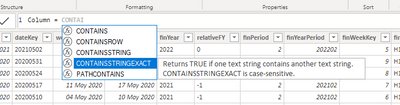
By the way, Intellisense is your friend here. If you're looking for something in DAX that helps you identify whether something CONTAINS something else, just start typing CONTAINS and Intellisense will show you if options exist:
Pete
Proud to be a Datanaut!
Hi @Anonymous
Try something like this:
_containsA =
IF(
CONTAINSSTRING(yourTable[Letters], "A"),
1,
BLANK()
)
This will give you flag of the value 1 if [Letters] has A in it, or Blank/Null if not.
By the way, Intellisense is your friend here. If you're looking for something in DAX that helps you identify whether something CONTAINS something else, just start typing CONTAINS and Intellisense will show you if options exist:
Pete
Proud to be a Datanaut!
Share feedback directly with Fabric product managers, participate in targeted research studies and influence the Fabric roadmap.
Check out the February 2026 Power BI update to learn about new features.
| User | Count |
|---|---|
| 61 | |
| 59 | |
| 42 | |
| 18 | |
| 15 |
| User | Count |
|---|---|
| 109 | |
| 101 | |
| 39 | |
| 29 | |
| 29 |