cancel
Showing results for 
Search instead for 
Did you mean: 

The Power BI Data Visualization World Championships is back! Get ahead of the game and start preparing now! Learn more

Reply
cthurston
Advocate II
Advocate II

Using a filter to show selected month and next month

Next Month.PNG


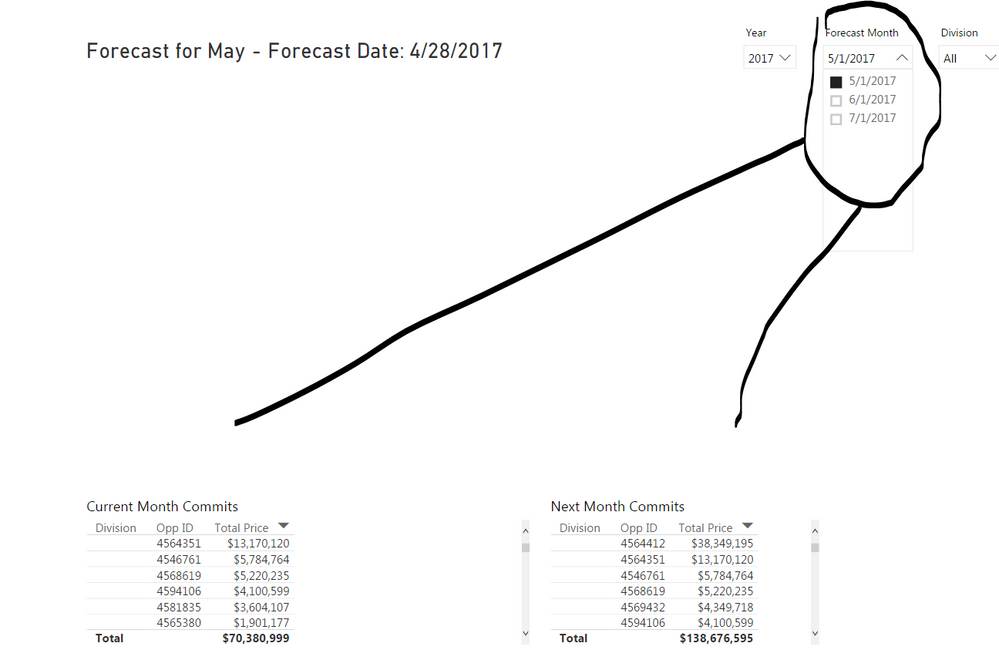
 I am attempting to use the filter such that the filter selection represents the current month and next month will represent the month after.  Any suggestions?  I have looked through the DAX functions with no ideas on how to accomplish this.

1 ACCEPTED SOLUTION
v-ljerr-msft
Microsoft Employee
Microsoft Employee

Hi @cthurston,


If I understand you correctly, you should be able to follow steps below to get your expected result.


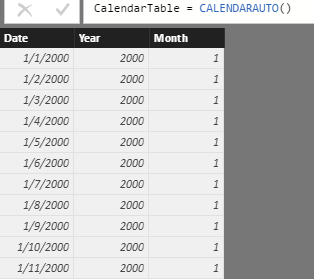
1. Create an individual Calendar table if you don't have one yet. And make sure there is no relationship between your fact table and the Calendar table.


CalendarTable = CALENDARAUTO()
Year = YEAR(CalendarTable[Date])
Month = MONTH(CalendarTable[Date])
t1.PNG


2. Use the formula below to create two measures to indicate if the date from fact table is current selected month or next month.

IsCurrentMonth = 
var aa= MAX ( CalendarTable[Year] )
return
IF (
    YEAR ( MAX ( Sales[Date] ) ) = MAX ( CalendarTable[Year] )
        && MONTH ( MAX ( Sales[Date] ) ) = MAX ( CalendarTable[Month] ),
    1,
    0
)
IsNextMonth = 
VAR currentSelectedMonth =
    MAX ( CalendarTable[Month] )
VAR currentSelectedYear =
    MAX ( CalendarTable[Year] )
VAR NextMonthSelected =
    IF ( currentSelectedMonth = 12, 1, currentSelectedMonth + 1 )
VAR nextYearSelected =
    IF ( currentSelectedMonth = 12, currentSelectedYear + 1, currentSelectedYear )
RETURN
    IF (
        YEAR ( MAX ( Sales[Date] ) ) = nextYearSelected
            && MONTH ( MAX ( Sales[Date] ) ) = NextMonthSelected,
        1,
        0
    )

Note: Replace "Sales" your fact table name.


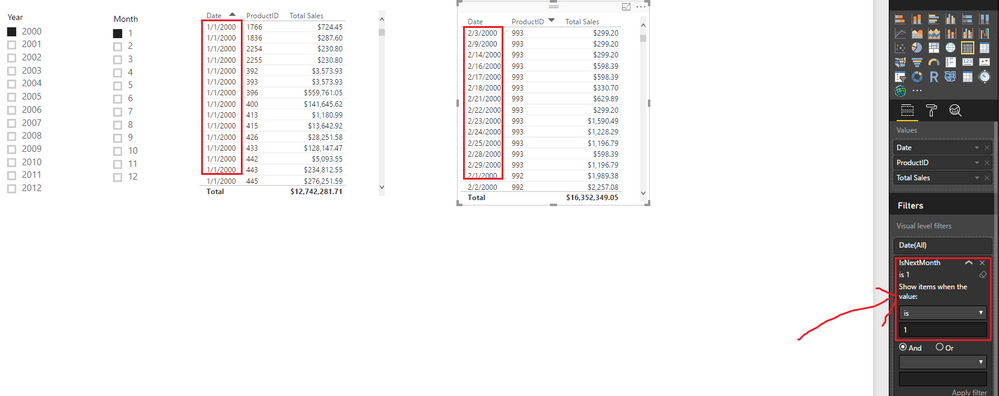
3. Use the measures as visual level filter(IsNextMonth is 1) to get the corresponding result. Smiley Happy


r4.PNG


Regards

View solution in original post

5 REPLIES 5
v-ljerr-msft
Microsoft Employee
Microsoft Employee

Hi @cthurston,


If I understand you correctly, you should be able to follow steps below to get your expected result.


1. Create an individual Calendar table if you don't have one yet. And make sure there is no relationship between your fact table and the Calendar table.


CalendarTable = CALENDARAUTO()
Year = YEAR(CalendarTable[Date])
Month = MONTH(CalendarTable[Date])

t1.PNG


2. Use the formula below to create two measures to indicate if the date from fact table is current selected month or next month.

IsCurrentMonth = 
var aa= MAX ( CalendarTable[Year] )
return
IF (
    YEAR ( MAX ( Sales[Date] ) ) = MAX ( CalendarTable[Year] )
        && MONTH ( MAX ( Sales[Date] ) ) = MAX ( CalendarTable[Month] ),
    1,
    0
)
IsNextMonth = 
VAR currentSelectedMonth =
    MAX ( CalendarTable[Month] )
VAR currentSelectedYear =
    MAX ( CalendarTable[Year] )
VAR NextMonthSelected =
    IF ( currentSelectedMonth = 12, 1, currentSelectedMonth + 1 )
VAR nextYearSelected =
    IF ( currentSelectedMonth = 12, currentSelectedYear + 1, currentSelectedYear )
RETURN
    IF (
        YEAR ( MAX ( Sales[Date] ) ) = nextYearSelected
            && MONTH ( MAX ( Sales[Date] ) ) = NextMonthSelected,
        1,
        0
    )

Note: Replace "Sales" your fact table name.


3. Use the measures as visual level filter(IsNextMonth is 1) to get the corresponding result. Smiley Happy


r4.PNG


Regards

Anonymous
Not applicable

Hi Folks,

Problem statement-

My data is getting updated on daily basis in Power BI but I want my graphs to refresh data on next month (09-09-2020) ( day is same for all months) now what measure should I use to achieve this in Page level filter/ graph level filter?


Thanks

Sumesh

This did it thank you!  You also opened my world as I was unaware we could use variable within BI in this way. 

Greg_Deckler
Community Champion
Community Champion

In general, you create a custom column along the lines of:


IsCurrentMonth = IF(MONTH(TODAY())=MONTH([Date]),1,0)


Follow on LinkedIn
@ me in replies or I'll lose your thread!!!
Instead of a Kudo, please vote for this idea
Become an expert!: Enterprise DNA
External Tools: MSHGQM
YouTube Channel!: Microsoft Hates Greg
Latest book!:
DAX For Humans

DAX is easy, CALCULATE makes DAX hard...

That is the current solution I am using to show current month.  My intention is to show the selected filter month and have the adjacent table show the next relevant to the selected month.  I knew my trouble would be describing exactly what I'm trying to do, does this clarify it any?

Helpful resources

Announcements
Power BI DataViz World Championships

Power BI Dataviz World Championships

The Power BI Data Visualization World Championships is back! Get ahead of the game and start preparing now!

November Power BI Update Carousel

Power BI Monthly Update - November 2025

Check out the November 2025 Power BI update to learn about new features.

FabCon Atlanta 2026 carousel

FabCon Atlanta 2026

Join us at FabCon Atlanta, March 16-20, for the ultimate Fabric, Power BI, AI and SQL community-led event. Save $200 with code FABCOMM.