cancel
Showing results for 
Search instead for 
Did you mean: 

Data Days is here! Join us now for 60+ days of learning, challenges, and connection. Learn more

Reply
Serkansson
New Member

Using Waterfall Charts

Hi Everybody,


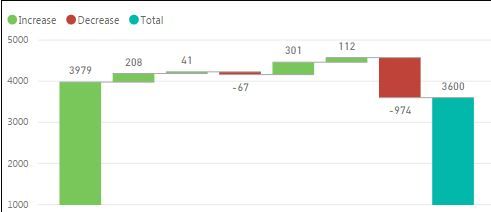
Can somebody help me why my starting point is same color as increases ?  

I just want to have simple waterfall chart ;  Budget  Variances (+/-)   then Actual.

But my starting point which is my budget has same color as variances i want it turquise as well.

Additionaly can i change the name of the Total ? I want to rename it as Actual YTD.


waterfall.JPG

2 REPLIES 2
v-jiascu-msft
Microsoft Employee
Microsoft Employee

Hi, @Serkansson,


Could you please mark the proper answer as solution or share the solution if it's convenient for you? That will be a big help to the others.


Best Regards!
Dale

Community Support Team _ Dale
If this post helps, then please consider Accept it as the solution to help the other members find it more quickly.
v-jiascu-msft
Microsoft Employee
Microsoft Employee

Hi @Serkansson,


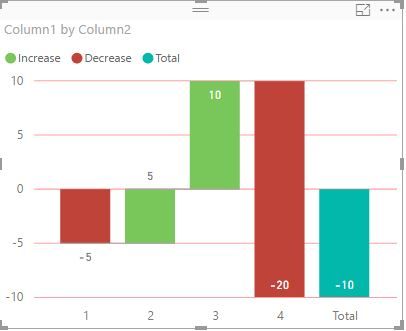
That's because your first value is bigger than 0. Maybe you can vote or submit an idea here: waterfall-chart-features. Then you can have more features that can be customized.


Using Waterfall Charts.JPG


Best Regards!

Dale

Community Support Team _ Dale
If this post helps, then please consider Accept it as the solution to help the other members find it more quickly.

Helpful resources

Announcements
Fabric Data Days is here Carousel

Fabric Data Days 2026

Don't miss out on Data Days, June 15 through August 7. Learn Fabric, Power BI, SQL, AI and more.

May Power BI Update Carousel

Power BI Monthly Update - May 2026

Check out the May 2026 Power BI update to learn about new features.

Power BI DataViz World Championships carousel

Power BI DataViz World Championships - June 2026

A new Power BI DataViz World Championship is coming this June! Don't miss out on submitting your entry.