This time we’re going bigger than ever. Fabric, Power BI, SQL, AI and more. We're covering it all. You won't want to miss it.
Learn moreLevel up your Power BI skills this month - build one visual each week and tell better stories with data! Get started
Hello Community,
I hope this request finds you all in good Spirits.
I am in need of some help.
Purpose:
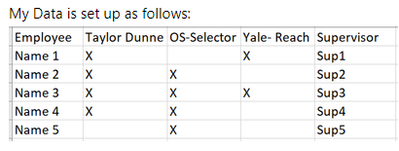
I am creating a dashboard that will allow frontline supervisors to quickly check their deparment's Completed equioment training. This will show each memeber of their team and what equipment they have been trained on and allow them them to filter down to only see equipment types or individuals.
Sources:
Sharepoint List that houses all employees and equipment types. example below
Problem:
When Querying the data into the BI I can not slice the information by equipment type in one slicer due to the Equipment Types being Columns. I have tried to get arround this by setting up a second list with the equipment types listed in row form as seen below.
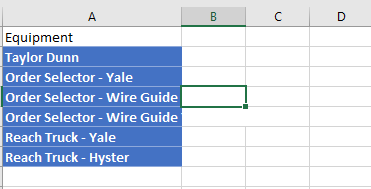
This way I can set equipment to a slicer.
The issue is as follows, I am using a switch statment to try and buid a table to that shows only the equipment selected in the slicer and if there is an "X" in the record from the main Sharepoint list and only share those people that are trained on that.
I have tried using the following DAX expression

Any comments or support is welcomed.
Solved! Go to Solution.
It sounds like you need to unpivot those columns in Power Query. You can duplicate your query to mak a dimension table out of it and then relate it back to your original records on the ID column. Remove all columns except the type columns and ID, then right click on ID and "unpivot other" - this will put all of the type columns into a single column. Then create a relationship between the tables, making sure the filter direction is "both" so that the dimension can filter the original table, and you should be able to slice on it.
Hello Christine,
I will give this a try and report back.
Thank you.
It sounds like you need to unpivot those columns in Power Query. You can duplicate your query to mak a dimension table out of it and then relate it back to your original records on the ID column. Remove all columns except the type columns and ID, then right click on ID and "unpivot other" - this will put all of the type columns into a single column. Then create a relationship between the tables, making sure the filter direction is "both" so that the dimension can filter the original table, and you should be able to slice on it.
It worked, thank you!
Check out the April 2026 Power BI update to learn about new features.
Sign up to receive a private message when registration opens and key events begin.
If you have recently started exploring Fabric, we'd love to hear how it's going. Your feedback can help with product improvements.
| User | Count |
|---|---|
| 35 | |
| 32 | |
| 25 | |
| 22 | |
| 18 |
| User | Count |
|---|---|
| 65 | |
| 35 | |
| 32 | |
| 25 | |
| 23 |