This time we’re going bigger than ever. Fabric, Power BI, SQL, AI and more. We're covering it all. You won't want to miss it.
Learn moreDid you hear? There's a new SQL AI Developer certification (DP-800). Start preparing now and be one of the first to get certified. Register now
Hi,
I'm trying to get to grips with the RANK function but I seem to be having a bit of trouble getting it to work. I have a table that stores opportunities for both contacts and companies and I would like to get the top ten ranked opportunites for companies only. To complicate matters slightly, the value column may hold NULL, 0.00 or a positive value (such as 124.16)
So the table would look a little like this:
accountid contactid value
1 Null 12
2 Null 0.00
Null 1 3
3 Null Null
4 Null 45
Null 2 23
5 Null 2.3
The output that I would like to achieve is:
accountid value rank
4 45 1
1 12 2
5 2.3 3
etc.
Any help would be greatly apreciated!
Solved! Go to Solution.
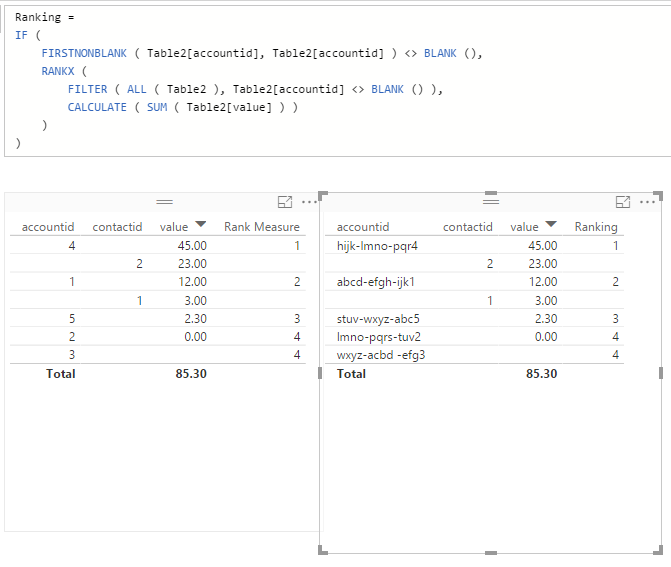
hi, please try this: (Is a @Sean version with little changes)
Ranking =
IF (
FIRSTNONBLANK ( Table1[AccountId], Table1[AccountId] ) <> BLANK (),
RANKX (
FILTER ( ALL ( Table1 ), Table1[AccountId] <> BLANK () ),
CALCULATE ( SUM ( Table1[Value] ) )
)
)
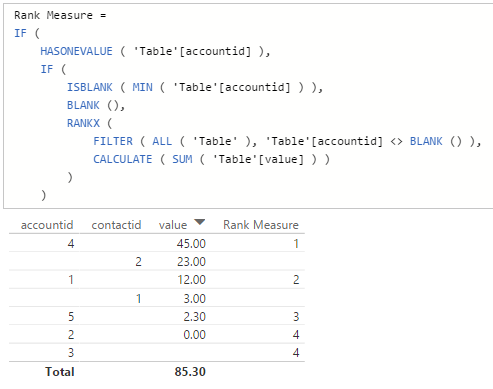
How about this...
Rank Measure =
IF (
HASONEVALUE ( 'Table'[accountid] ),
IF (
ISBLANK ( MIN ( 'Table'[accountid] ) ),
BLANK (),
RANKX (
FILTER ( ALL ( 'Table' ), 'Table'[accountid] <> BLANK () ),
CALCULATE ( SUM ( 'Table'[value] ) )
)
)
)Here's the result...
Good Luck! ![]()
EDIT: @Vvelarde's IF (... below takes care of the text format @eyeball
(the Rank itself remains the same just the condition is changed)
Thanks for this!! I've been trying to get Rank to work for a while now and this soution was perfect.
Hi Sean,
Many Thanks for this, it looks good! The only problem I've got now is that the Id is actually a guid (sorry, should have mentioned that) so the min function is seeing it as a string...
Check out the April 2026 Power BI update to learn about new features.
Sign up to receive a private message when registration opens and key events begin.
If you have recently started exploring Fabric, we'd love to hear how it's going. Your feedback can help with product improvements.
| User | Count |
|---|---|
| 34 | |
| 31 | |
| 25 | |
| 20 | |
| 16 |
| User | Count |
|---|---|
| 60 | |
| 48 | |
| 29 | |
| 23 | |
| 23 |